
BitTorrent Jargon

Written by Ernesto on March 30, 2006 

Because I sometimes implicitly assume that everybody is completely familiar with the BitTorrent jargon. I decided to make a little BitTorrent dictionary to explain some of the nerdy stuff. I hope this hope this is useful to some of you.

.torrent: A .torrent fille contains all the info you need to download the file you want. For example, a torrent file has info on the size, the filename, and how to connect to other people (tracker). Another important function of the .torrent file is that it has a “hash” (sort of a digital signature) of each part of the file to make sure you don’t download corrupt of fake data but “the real thing”.

Client: The BitTorrent client is the application you use to “load” the .torrent file so that you can connect to other people. There are a lot of different torrent clients available. The three most popular clients are Bitcomet, Azureus and uTorrent. If you’re new to
BitTorrent I would recommend uTorrent, It’s light and has a great settings wizard to help you on your way.

Indexer: Indexers are websites which list (index) .torrent files (myBitTorrent, Torrentz, Mininova etc.).

Leecher: A leecher is someone who is downloading (and uploading) a file. You are a leecher if you do not have a complete copy of the file you’re trying to get. Note that a leecher normally is someone who’s not uploading, that’s not true in the BitTorrent jargon.

Peer: A peer is the same as a leecher, but without the negative connotation.

Ratio: The data you uploaded divided by the data you downloaded. A ratio higher than 1.00 means that you upload more than you download, which is a good thing. Most private trackers keep track of your ratio and will ban or block you if you have a bad ratio. Try to get at least a 1.00 or higher ratio.

Scrape: Scraping means that your BitTorrent client is requesting info from the “tracker” about other people who are down- or uploading the file. This is important because you need to know who has pieces of the file you still need.

Seeder: A seeder is someone who has a complete version of the file you are downloading. If there are no seeders, you probably wont be able to get the file. So seeders are extremely important, make sure to “seed” the torrent once you finished downloading.

Tracker: The tracker is a server that has all the info about the people that are down- and uploading the file. The tracker itself does not have a copy of the file, it only tracks the up- and dowloaders and makes sure people are able to connect to each other. A tracker is not the same as a website that hosts torrents. Mininova for example is not a tracker, just a “torrent-site”.

Super-Seed: Some clients have the option to “super-seed”. Super seeding is different from seeding because it tries to send out pieces of the file that have not been sent before. So instead of sending the same piece to several peers, it tries to send a unique piece to everyone so that other peers can swap those pieces.

Swarm: The swarm are all seeds and peers that are connected together. So if your client shows 5 seeds and 10 peers then that’s your swarm.

Azureus has a plugin to visualize the swarm
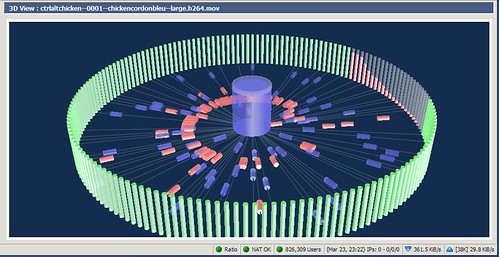
azureus BitTorrent swarm

Now let’s see if you learned something. If you can understand the next sentence you probably have.

DHT: DHT stands for “Distributed Hash Table”. DHT layers “decentralize” torrents what make them more stable and less reliant on the web based trackers. If a web based tracker goes down, the torrents stay alive because peers can act as “nodes” keeping the swarm intact.

If you have something to add, drop a comment!

Previously: Torrentspy tells the MPAA to sue Google

Next: Mininova the most popular BitTorrent Site

43 Responses

Pages: [1] 2 » Show All

1 Mar 30, 2006 at 19:51 by Michael Ayala

Thank you. I’m new to torrent. These definitions were helpful and brief. Can you provide more definitions/info in the same format.

2 Mar 30, 2006 at 20:06 by TheWatcher

Indexer - Indexers are websites which list (index) the 1,000s of .torrent files available. The best indexer is myBittorrent.com! Nah … just kidding. There are loads out there. Greetz go to mininova.org, torrentspy.com, torrentreactor.net, torrentportal.com and torrentz.com :)

3 Mar 30, 2006 at 21:29 by Ernesto

lol TheWatcher, I will add Indexer ;)

4 Mar 30, 2006 at 21:58 by Steffen

Nice stuff. Some of these words I wasn’t that familiar with.

5 Mar 31, 2006 at 07:31 by Volker

Thanks for the definitions. But isn’t the swarm just the clients that a client ‘knows of’ (is in contact with, has handshaked with recently …), rather than ‘all the people’ (sc. in the torrent) ??
Best,
Volker

6 Mar 31, 2006 at 11:54 by Ernesto

That’s right Volker, I’ll rephrase it to make that clear. Added ratio.

7 Mar 31, 2006 at 15:00 by falafelboy

Excellent summary, very easy to follow. But…hmmmm…you forgot to define a torrent file!

8 Mar 31, 2006 at 15:46 by Ernesto

you’re right falafel, added .torrent

9 Apr 01, 2006 at 23:48 by EVTT

Yeah, also add a sentence ~ BitTorrent clients “peer sharing” to last chapter - and “Reseeding” as well.

10 Apr 03, 2006 at 14:27 by Fredspage

This cleared up a lot of my queries. Although I wrote my first computer programs in 1961 I am afraid it has gotten away from me in the last few years.
Fred

11 Apr 03, 2006 at 22:25 by Valeriu Ginghina

I am also new on torrents, and the dictionary was really helpful to me. There is still one question (for now… :-) ) which is bothering me: how do you “seed” the torrent once you have downloaded the file? I found in BitComet menu some two items, “seed only” and “reseed only”. Do I have to use one of them after I finish downloading the desired files?
Thanks!!

12 Apr 03, 2006 at 22:37 by Ernesto

@Valeriu Ginghina

You don’t have to do anything. Just keep bitcomet running and you will see that you will keep uploading

13 Apr 08, 2006 at 19:28 by djlodose

I’m new to torrenting but I still havent figured out to make my own torrent which is bigger than the 8mb that BitComet has..any help will be appreciated.

14 Apr 08, 2006 at 20:23 by ste uk

mucho gratci,

nice one kid,

15 Apr 12, 2006 at 06:46 by don juan

what are the announce.php stuff?

16 May 31, 2006 at 22:32 by mike

Thanks man i did’t know all of them
good luck with the cops

Mike from Greece !!
To seed or not to seed that is the quest
SEED long and PROSPER
(i know i will)
seedlong man ;)

17 Jun 04, 2006 at 22:26 by poker deposit bonus party poker play money

unmentionable renovated,argue paraded dives optimally abode.eight

18 Jun 08, 2006 at 00:04 by Snake

Really helpfull topic, I’m also new to bittorrent. Bu thanks to this now I know what that (stupid me) up ratio means.

Keep on seeding.

19 Aug 27, 2006 at 00:11 by BOLt

Nice guide. I knew pretty much all of the terms except for the last one. Thanks for clearing up the particulars of DHTs.

Is there any sort of counterpart to Azureus’s visualization plugin for, say, uTorrent?

Thanks!

20 Aug 27, 2006 at 10:14 by axea

Very useful guide for a noobie AND for people (like me) who though using torrent for a while now are not conversant with what goes on under the hood.

Thanks

21 Sep 03, 2006 at 14:17 by knight17

That was a nice guide for n00bs.I found it difficult at first time while I used Bittorrent but at that time I searched Yahoo!(I some times like Yahoo! and Gigablast than Google :)) for each term and learn about almost everything.

@BOLt
uTorrent doesn’t allow you to install any type of plug ins at all :(.The developer has said in the FAQ section that that feature won’t be added to uTorrent in the future, May be he wish to keep the application as light as he possibly can and avoid any security loop holes.

22 Nov 02, 2006 at 04:42 by Bill

What does it mean when a torrent is “nuked”.

23 Feb 15, 2007 at 22:59 by Gus

Yeah, i would like to know what you type in google search to only get torrent results

GB

24 Mar 08, 2007 at 13:43 by kM

NUKED -

A film can be nuked for various reasons. Individual sites will nuke for breaking their rules (such as “No Telesyncs”) but if the film has something extremely wrong with it (no soundtrack for 20mins, CD2 is incorrect film/game etc) then a global nuke will occur, and people trading it across sites will lose their credits. Nuked films can still reach other sources such as p2p/usenet, but its a good idea to check why it was nuked first in case. If a group realise there is something wrong, they can request a nuke.

NUKE REASONS…

this is a list of common reasons a film can be nuked for (generally DVDRip)

BAD A/R = bad aspect ratio, i.e. people appear too fat/thin
BAD IVTC = bad inverse telecine; process of converting frame rates was incorrect.
INTERLACED = black lines on movement as the field order is incorrect.

25 Mar 31, 2007 at 12:01 by harry

hi thanks great

i have been dowloading stuff but now i understand what these jargon means

thanks again

H

Pages: [1] 2 » Show All

Responses are closed

All remaining responses will continue to be archived. Use the TorrentFreak forums if you want to discuss something.