
The list of ISP’s that limit BitTorrent traffic, or plan to do so is growing every day, and according to the BBC, the ‘bandwidth war’ has begun.
Are you not sure if your traffic is being throttled Check the list of bad ISP’s.
But there is a solution. Encrypting your torrents will prevent throttling ISP’s from shaping your traffic. I will explain how to enable encryption in Azureus, uTorrent, and Bitcomet, the three most popular torrent clients.
What does encryption Do?
The RC4 encryption obfuscates not only the header but the entire stream. This means that it’s very hard for your ISP to detect that the traffic you are generating comes from BitTorrent.
Note that RC4 uses more CPU time than the plain encryption or no encryption. It is however harder to identify for traffic shaping devices
How can I do this?
This is different for all clients; check the setting for your favorite client below.

1. Go to: Tools > Options > Connection > Transport Encryption
2. Check the ‘require encrypted transport’ box.
3. Choose RC4 in the ‘minimum encryption’ dropdown box
note that RC4 uses more CPU time than the plain encryption or no encryption. It is however harder to identify for traffic shaping devices
4. You can choose to tick the ‘Allow non-encrypted outgoing connections if encrypted connection attempt fails’ box. This will ensure compatibility with clients that are not using encryption. However, it makes it easier for your ISP to detect BitTorrent traffic. I recommend that you try to tick this box first. If you are still not getting proper speeds untick it
5. Tick the ‘Allow non-encrypted incoming connections’ box
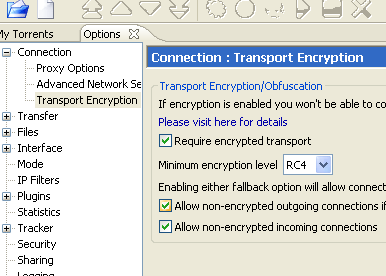
That’s it, your BitTorrent traffic is encrypted now.

1. Go to: Options > Preferences > Advanced > Connection
2. Go to: ‘Protocol encryption’ You can choose between ‘auto detect’ and ‘always’. Auto detect will give you more connections but offers less protection against traffic shapers.
I would recommend to try auto detect first, if that doesn’t increase your speeds you need to switch to always
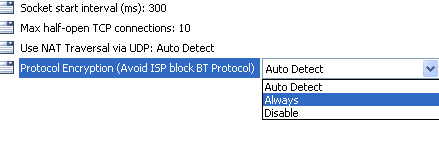
That’s it, your BitTorrent traffic is encrypted now.
uTorrent

1. Go to: Options > Preferences > BitTorrent
2. Go to ‘Protocol encryption’, you can choose between ‘enabled’ and ‘forced’. ‘Enabled’ will give you more connections but offers less protection against traffic shapers.
I would recommend to try ‘enabled’ first, if that doesn’t increase your speeds you need to swich to ‘forced’.
3. Ticking ‘Allow legacy incoming connections’ allows non ecrypted clients to connect to you. This improves compatibility between clients but makes you more vulnerable to traffic shapers.
I would recommend to tick this box, but if that doesn’t increase your speeds, untick it!
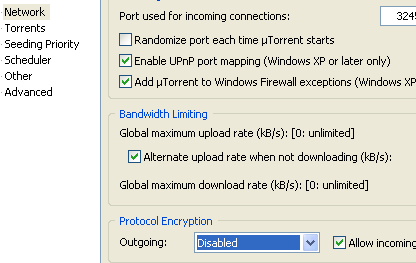
That’s it, your BitTorrent traffic is encrypted now.
Good luck and happy torrenting







