How To Use Usenet, A Beginners Guide
Written by Ernesto on April 10, 2007Usenet is considered to be the most “private” way to share files. In other words, no MPAA or RIAA watching your back. It is fast, has a lot of content, and it’s getting more popular, even though the technology is almost 30 years old. Time for an introduction.
Sounds great, but let me start off with the downside to Usenet. The biggest disadvantage is that high speed Usenet servers are not free. You need at least some kind of paid subscription plan to be able to get decent speeds on Usenet. For some people this is not a problem, their argument often is that they already pay a lot of money for high speed broadband access, so why not pay a little extra to get the best speeds out of it.
The Easy Solution
For those who are new to Usenet and want the easy route, we recommend trying a free trial at Binverse. This give you all the tools to start downloading from Usenet quickly, and guarantees fast downloads. Binverse has its own built in search engine and a custom download client.
If you’re not satisfied with Binverse you can try other providers. However, a premium service will always cost a few bucks.
The Alternative Solution
1. Download Grabit here.
2. Double click the downloaded file and proceed to install.
When installing make sure ‘Associate Grabit with NZB files’ is selected.

3. Before clicking “Finish” select “Launch Grabit”. If you missed this look for the grabit icon on the desktop and double click it.
4. Once launched you’ll be asked to enter the name of your usenet server. If you have a premium server (highly recommended, e.g. a free trial at Binverse) select the check box and press next.
5. If you selected the checkbox you’ll then be asked for your news server username and password. Enter them and press next.

Note: Your username/password are case sensitive! Be sure to enter them correctly.
6. You be asked whether to retrieve a list of groups from the news server. Select the checkbox and click finish.
7. Grabit will load fully and begin downloading the grouplist. While it’s downloading continue to step 8.

8. Go to the ‘Edit’ menu and select ‘Preferences’.
9. Select the ‘Folders’ tab. Click the button right of the box containing the download directory. Here you can select the folder you want files to download to.
10. Go to your favourite NZB site (eg. newzleech, yabse) and download an NZB file. Double click the NZB file. You’ll be asked whether you want to import the NZB file, just click ‘Grab’.

11. The NZB file will be imported. If you’ve done everything right the files should then begin to download.
Downloading:

That’s all there is! Well done you’ve downloaded your first files from Usenet.
The following isn’t completely necessary but can save alot of time, especially if you don’t want to deal with 100s of par/rar files.
1. Download ParNRar here
2. Double click the downloaded file and install.
3. Launch the ‘ParNRar’ by double clicking the purple icon on the Desktop.
4. Click the button on the right of the monitored directory and select your download directory. This is the same place you used for saving files with Grabit.
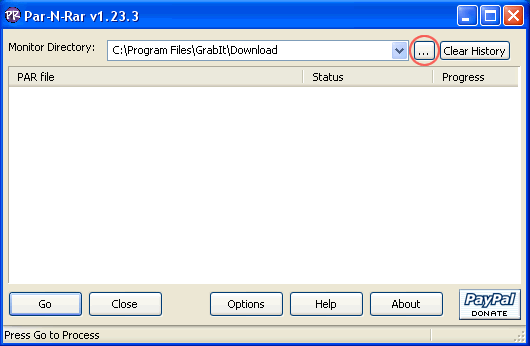
5. Click ‘Go’. ParNRar will then scan your Grabit download directory checking and extracting any files present.
For extra customization click the ‘Options’ button. There are a range of options to choose from.
One useful option is to have ParNRar check the download folder every X seconds for new parts. To do this select the ‘When done scanning:’ box and change to restart. Then enter a delay between restarts.

Previously: Automate Your BitTorrent TV Downloads on OS X
Next: Rogers Fights BitTorrent by Throttling All Encrypted Transfers


26 Responses
do i have to pay? there ir no free servers?
perfect… been curious about this option… anyone know of comparable mac software for usenet?
[quote comment="83399"]do i have to pay? there ir no free servers?[/quote]
Once in a while you may find free betas, like I did with easynews.nl, but they aren’t taking any new testers. Unless your ISP offers binaries (rare), generally you’d have to pay.
in a hierarchy of all things leaked online is through usenet usually the first place files show up?
Mac Software
I use Unison for the download client. Then I use MacParDeluxe for par and rar files. Have not had any issues.
quiet, don’t let the cartels on on this
#4:
Pretty much the chain goes;
Top sites (scene release sites)>Usenet>IRC>Torrents>Rapidshare and such
well, that’s basically the way it goes
#7 except for 0sec torrent sites.
This is a way better guide to usenet imo: http://mantup.com/
I agree about Unison, it seems to have a good interface, but it does get a bit slow when you have a lot of headers to download.
Also my ISP added Usenet as a free service – I think it was an attempt to limit the up load component of BitTorrents (quite clever without having the problem of strangling specific ports). So now I can blow my month’s download quota in 4 hours!
MacPar Deluxe is a bit slow to put rars together – I prefer apps such as UnRarX (script to the underlying unix shell), but Mac Par Deluxe is important to unmangle those files that go pairshaped…
Benedict
@Robert: the guide above, unlike the one at mantup.com allows one click downloads, including archive checking and processing.
If you want to try usenet http://usenetserver.com does a 3 day $3 trial.
The trick is to find and isp that, as part of its service, peers with one of the premium usenet providers.
As far as the guide: meh.
I am an avid user of newgroups. I’ve tried astraweb, giganes, and usenetserver. for the money, usenetserver was the best, and they had pretty good retention as well. If I remember correctly, I paid like 15 dollars a month, and it was worth every penny. No worries on uploads is nice, and getting stuff at 1100kbps is nice as well. I’ve recently switched to my free newsserver provided by my isp. retention sucks, I think its at like 5 days, but I get unlimited downloads and can access my full 8 meg speed, and its all free, free, free. A lot of providers offer a free service out here, but they all have different stipulations. my last isp gave unlimited speed, and had 90 day retention, but only allowed you to grab 2 gigs a month, something I can do in about an hour, so that service sucked. I’d suggest calling up your isp and asking about their newsservice, just to see where they stand with it and what, if anything, they offer. giganews and astraweb offer capped services, meaning a limit per month on how much you grab, for around 7 bucks I believe, so thats a good way to go to check out if you like it or not. Most people get hooked and eventually drop bittorrent as their main source for stuff after getting into newsgroups, mainly beacuse of the ease and speed, but there are the select few who hold on to the freebie bittorrent as the end-all-be-all of filesharing. I suggest trying for yourself and seeing what you personally prefer. its easy to use and learn, and quicker then a blowjob from a supermodel, heh – CJ
@Benedict – you mean ‘parshaped’! I’m here all week.
I use iGrabNews on the Mac, mostly because it was the only free app i could find. Is Unison the best on a Mac and is it worth the $25?
Personally, i did not like the introduction to this thread, to say that Usenet is the safest source of file sharing of all the rest mainly because it gives the RIAA and MPAA more of a reason to attempt to hunt us down. Granted, they won’t be able to but they might be able to find a way to really pressure the usenet providers to fork over a few names and then plaster the accomplishment on the news.
Personally, i don’t also like how people don’t really know the shear amount of traffic and files that are available on Usenet and simply using programs like GrabIt will limit you to knowing the full aspects of Usenet and the mass amounts of actual data transfer and discussions. You can’t even think of NNTP as a part of the Internet anymore, it is it’s own entity in itself.
Yes, Usenet is “free” but if you are willing to shell out some spare cash – it will open you up to opportunities that you could never imagine.
i hope that Usenet remains a pure force in the file-sharing community and doesn’t get bombarded w/ complete shit like in the torrent community.
@Sam,
For my older G5 – yes – Unison is very set and forget! as long as I do not open too many newsgroups at the one time.
For the newer intel machines – I am unable to comment.
There are other “free” ‘nix apps / newsreaders out there. Several with an applescript shell are quite usable (Lucy – yuck, MT_newswatcher and PAN – never used PAN but gets good reviews), and a few on the X11 (esp. Knews – you may be familiar with if a linux user and XVNews – nice app shell if coming from Windoze) platform (X11 is a freebee on your install disk).
[QUOTE=..:: c.R ::..]You can’t even think of NNTP as a part of the Internet anymore, it is it’s own entity in itself.[/QUOTE]
NTTP was around before the internet as its own entity!
http://en.wikipedia.org/wiki/Usenet
I use usenet anyday over torrent (only due to the reason my ISP only allows a total of 20kb’s on the torrent system (with ports open/closed/half opened blah blah besides i don’t like the system much)
but once you got a decent server, and hang to it, its lovely. Im at a total of 2248kbs, (take off the 8) and you get 224kbs download speed, usenet downloads at exactly that all the time, no less somtimes faster if it can but thats rare.
Some news servers to take into consideration: giganews
I use NZBPlayer from http://www.nzbplayer.com
I STREAM divx and 720p with it directly from Usenet!
fzvrm jcokh bapdhv wzrgoytse zmeoi pbsynl dtfemgib
trzwjl fxdeiqzow omkhuy yapu gorcjpft czhudao vuir oenpm hetynd
Let’s just clear the air of some of the pixie dust floating around here guys – downloading via usenet is certainly a lot more effective than any bittorrent, if you know what you’re doing, but is definitely is NOT anonymous.
Fact is, your ISP can monitor all of you search requests and whatever sownloads pass through you connection, unless you encrypt. If your newsgroups are provided by your ISP they will be maintaining logs of access, and can be forced to turn them over to whomever of the “nastys” requests them – whether that’s police, or the RIAA and MPAA.
The only way you can pretty much ensure anonymity is by using an encrypted service, by tunneling, and making sure that you’re covered both on the request and on the reception of files.
Some anonymity methods such as proxy use, still leave you vulnerable, so know what you’re doing, check it out, if you’re going to be doing something that “the Man” sasy is a “no-no.”
Of course, there’s one absolutely sure-fire method of avoiding ever being caught, or having to pay a penalty – or worse, and that’s to use………… wait for it!……. honesty! Don’t do anything illegal, don’t steal files, don’t dabble in doubtful activities, and you’ll never have to spend a day regretting what you’ve done! Eh! But that’s too borning no?
See ya on the inside, (of the Newsgroups I mean) – what? you thought I meant…. nah, not you, you’ve got a face even babies would trust ain’t you?
Chaz
I Think,İt is very nice information…
Hitchhiker Nation
[quote comment="83425"Once in a while you may find free betas, like I did with easynews.nl, but they aren't taking any new testers. Unless your ISP offers binaries (rare), generally you'd have to pay.[/quote]
Well, Thats just stupid. If I’m not going to pay for the Software then why in the h&ll would I pay a monthly fee for uselessnet? I don’t need another bill. Wanna know the reason they can get away with a monthly fee? Cause morons like you pay!!!
In 10 years on the net I have never paid for music/movies/warez. and I never had a problem. know why? It’s free to download.
RLMFAO what a bunch of noobs…
I’ll stick to the torrents… You can stick to being brain dead..
“theres all this awesome info floating around on the net. You just have to know how to grab it!”
Oh, you may want to put a few more google ads on this site. I mean it’s only 3 times wider then normal.. Web design 101… It’s cool though, the page it so wide I don’t even see the ads on the right without scrolling. and that ain’t gonna happen…
The idiot just oozes out of this site.
Why can’t I get access to usenet same way “ISP” does – aka how to open own usenet server?
but is it good for getting porn?
4 references to this post
Responses are closed
All remaining responses will continue to be archived. Use the TorrentFreak forums if you want to discuss something.



