
P2P-TV Scene Tags
Written by Ernesto on April 10, 2006Downloading TV episodes has become extremely popular within the BitTorrent/P2P community. However, some of you might not be completely familiar with all the TV-Torrent tags. The filename of a TV-Torrent contains a set of tags that give you information things like the source, quality, and release group.
Source Tags
These tags indicate the source and are an indication of the “quality” of the rip.
TVRip: Recorded from analog TV, lowest quality of all TV rips
DSRip: Recorded from Digital Satellite, good quality rip
PDTV: Recorded from Pure Digital Source, but not HDTV. The quality is similar to a DSRip
HDTV: Recorded from a HDTV source. High video and sound quality. The video resolution is often 624×352, and the audio stream 128kb/s MP3
HR.HDTV: Best Quality There is. Recorded from a HDTV source. The video resolution is often around 960×540 which is half the size of the original HDTV broadcast. A 45 minute show is often 700MB instead of 350MB like the other releases.
Release Group Tags
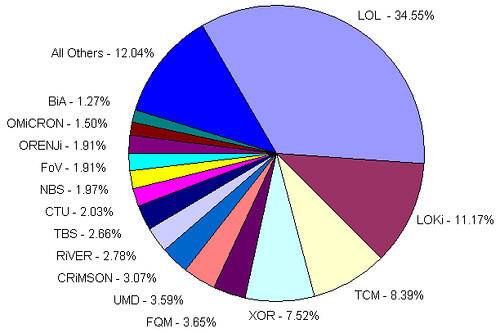
The groups that release the episodes often include their group tag. The 10 most active tv-release groups are:
LOL, LOKi, TCM, XOR, FQM, UMD, CRiMSON, RiVER, TBS, CTU
Market Share (cte)
Compression
Sometimes the filename has some info about the compression format. For video you will often see Xvid or Divx, this means that you need these codecs if you want to play the file. An example of an audio tag is AC3.5.1. The audio tag is often included in high quality rips to indicate that the audio is not compressed.
Other
Proper: The proper tag is to indicate that the show is released before by a different release group, but that this release is of higher quality.
Repack: The Repack tag indicates that this is an improved version of an earlier release. If the initial release contains sound or video errors for example, the second release will have a repack tag.

Previously: BitTorrent & P2P Linkdump (14)
Next: Targetpoint is buying BitTorrent sites


6 Responses
Is it possible to play hr.hdtv on a xvid standalone dvd player?
such a pretty pie chart.
Great stuff, thx. The PROPER is usually associated with the prior release being nuked as well. So PROPER is more of a negative connotation than the way u put it!
But I learned a lot, thx.
:)
“Nick” -maybe you got your answer already -i hope so, but if not or others having the same question. Quote: “Is it possible to play hr.hdtv on a xvid standalone dvd player?”
Well that would depend on your standalone player, if it can handle the resolution size. If it is a HD player, then it should. Mine cannot, it is not HD it has a max of 720x??? i forget at the moment… but anyway, just check you manual specs and then check the resolution size of the file (tv-rip) you want to play. You might also want to check the audio specs too, and the encode of the file.
-cheers
Thanks! These codes had been puzzling me for a while but I was afraid to ask in case the cool kids laughed at me :)
Does anyone know the exact encode method that LoL uses? All of their files are of the best quality that I can find anywhere. I would love to know their method - and I know that it must be standardized internally amongst the group members, because all of the releases are of that quality.
Responses are closed
All remaining responses will continue to be archived. Use the TorrentFreak forums if you want to discuss something.





