Home > Technology > How To >
There are many ways to remotely initiate BitTorrent downloads, but most are complicated and require tweaking. Here's an easy way to remotely download torrents with only an instant messaging application and a BitTorrent client.
The most common way to remotely download torrents is via a WebUI. On the Mac, the only BitTorrent client with a WebUI is Azureus, and that’s via a plug-in. Most people would find it confusing to open up ports in their software firewall to configure the plug-in, and TorrentFlux is strictly for über geeks. Thanks to a bit of clever thinking on the part of Ruairi, a contributor to macosxhints.com, you won’t have to bother with any advanced settings or run the PHP-based TorrentFlux on your web server.
Here’s what you need to do:
You will need to have either Adium or iChat+Chax installed. Both Adium and the Chax plug-in for iChat are free.
Set up a new iChat account (or any other kind of account — except Gtalk — for Adium). This will be logged in on your home machine.
Then add the new account you’ve created as a buddy on your normal account, which you’ll use at work, school or wherever.
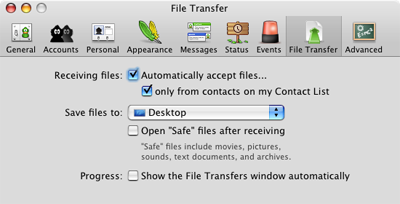
In iChat > Preferences > Chax (or Adium > Preferences > File Transfer) set it to automatically accept file transfers, and specify a directory, even Desktop will do. I recommend you use Adium, since it gives you the extra option of accepting file transfers only from your contacts.
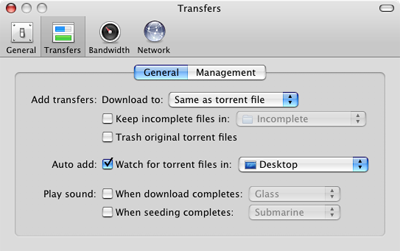
Now set up either Transmission (Beta), Azureus or Xtorrent to watch that directory for torrent files.
That’s it, you’re done. Now whenever you send your IM account that’s logged in at home a torrent file, it’ll automatically start downloading it! A simple, yet effective solution.
Have you already tried this, and has it worked for you?