How To Encrypt BitTorrent Traffic

Written by Ernesto on April 16, 2006 

More and more ISP’s are limiting and throttling BitTorrent traffic on their networks. By throttling BitTorrent traffic the speed of BitTorrent downloads decrease, and high speed downloads are out of the question.

Tip: Want to download Torrents anonymously? Try a TorrentPrivacy, the only way to download torrents securely. Encryption does not protect your privacy.

The list of ISP’s that limit BitTorrent traffic, or plan to do so is growing every day, and according to the BBC, the ‘bandwidth war’ has begun.

Are you not sure if your traffic is being throttled Check the list of bad ISP’s.

But there is a solution. Encrypting your torrents will prevent throttling ISP’s from shaping your traffic. I will explain how to enable encryption in Azureus, uTorrent, and Bitcomet, the three most popular torrent clients.

What does encryption Do?

The RC4 encryption obfuscates not only the header but the entire stream. This means that it’s very hard for your ISP to detect that the traffic you are generating comes from BitTorrent.

Note that RC4 uses more CPU time than the plain encryption or no encryption. It is however harder to identify for traffic shaping devices

How can I do this?

This is different for all clients; check the setting for your favorite client below.

Azureus

azureus bit torrent

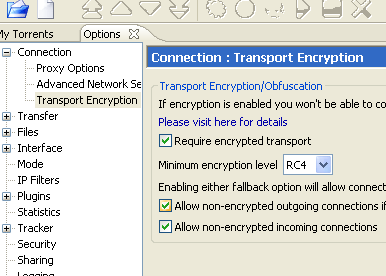
1. Go to: Tools > Options > Connection > Transport Encryption

2. Check the ‘require encrypted transport’ box.

3. Choose RC4 in the ‘minimum encryption’ dropdown box

note that RC4 uses more CPU time than the plain encryption or no encryption. It is however harder to identify for traffic shaping devices
4. You can choose to tick the ‘Allow non-encrypted outgoing connections if encrypted connection attempt fails’ box. This will ensure compatibility with clients that are not using encryption. However, it makes it easier for your ISP to detect BitTorrent traffic. I recommend that you try to tick this box first. If you are still not getting proper speeds untick it

5. Tick the ‘Allow non-encrypted incoming connections’ box
azureus bit torrent

That’s it, your BitTorrent traffic is encrypted now.

Bitcomet

bitcomet bit torrent

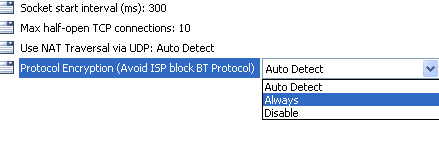
1. Go to: Options > Preferences > Advanced > Connection

2. Go to: ‘Protocol encryption’ You can choose between ‘auto detect’ and ‘always’. Auto detect will give you more connections but offers less protection against traffic shapers.

I would recommend to try auto detect first, if that doesn’t increase your speeds you need to switch to always
bitcomet bit torrent

That’s it, your BitTorrent traffic is encrypted now.

uTorrent

utorrent bit torrent

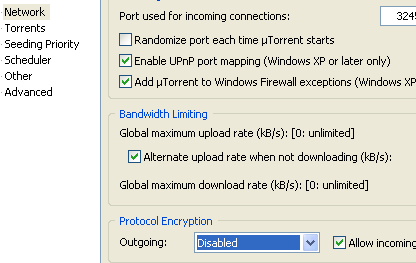
1. Go to: Options > Preferences > BitTorrent

2. Go to ‘Protocol encryption’, you can choose between ‘enabled’ and ‘forced’. ‘Enabled’ will give you more connections but offers less protection against traffic shapers.

I would recommend to try ‘enabled’ first, if that doesn’t increase your speeds you need to swich to ‘forced’.

3. Ticking ‘Allow legacy incoming connections’ allows non ecrypted clients to connect to you. This improves compatibility between clients but makes you more vulnerable to traffic shapers.

I would recommend to tick this box, but if that doesn’t increase your speeds, untick it!
utorrent bit torrent

That’s it, your BitTorrent traffic is encrypted now.

Good luck and happy torrenting

Previously: Filesharing Around The Globe

Next: George Bush vs. The RIAA?

301 Responses

1 Apr 17, 2006 at 02:06 by David

I use Telus Canada, does that do anything?

2 Apr 17, 2006 at 02:36 by Katou

Hello, i live in Argentina and my english is too bad. i write this note for give you a thanks for this help. bye

3 Apr 17, 2006 at 02:59 by ripper2256

Is encrypting just for fooling taffic shapping ISPs, or will this also provide anonymity?

4 Apr 17, 2006 at 03:09 by Jeffk

Telus does not have packet shaping, infact they are so behind they cant even inforce their bandwitdh limits.

5 Apr 17, 2006 at 03:12 by njm

What I’d like to know is if encrypting effects share ratios?

6 Apr 17, 2006 at 03:12 by Lome

i use a mac and Azureus.
it doesnt have feture…

7 Apr 17, 2006 at 03:14 by niglb

Telus does track torrent traffic thou in some form, I’ve had a recent email telling me about “illegal” traffic packets sourced from torrents I’ve had downloading. This was before utorrent enabled encryption.

8 Apr 17, 2006 at 03:34 by Paul D. Spradling

@ripper
Encryption is not designed to provide anonimity, it is designed to prevent traffic shapping.

@njm
Encyprion does not affect share ratios in any way.

@Lome
I also use a Mac and Azureus and IT DOES have this feature.

9 Apr 17, 2006 at 03:39 by N3M3515

1.) it doesnt make you anonimous, as you people connecting to you still can get your ip address.

2.) If you want to block known “bad” ip addresses go download Peer Guardian from methlabs dot com. A decent firewall software that blocks known entities that would like to stop you from being a scurvy pirate.

10 Apr 17, 2006 at 03:40 by Slim

Anyone know what the situation is with Bell Sympatico (also in Canada)? Do they throttle bittorrent trafic? Or monitor their network for illegal content?

11 Apr 17, 2006 at 03:41 by dabs

@Lome

Azureus is Azureus, platform is irrelevant, kinda the whole point of java…

12 Apr 17, 2006 at 03:42 by Pumpkin Escobar

Yep, Azureus is the same whether you use a Mac or a PeeCee.

Made the change and watched the d/l speed throttle right up on Comcrap.

13 Apr 17, 2006 at 04:04 by Adam

This worked tremendously for uTorrent.

14 Apr 17, 2006 at 07:14 by IguanaNed

ISP Throttling you?
Let others know where you are, put yourself on this Frappr Map
http://www.frappr.com/broadbandusersagainstbittorrentthrottle

15 Apr 17, 2006 at 07:21 by Downie

Yup, can’t stand this on Comcast… Drives me crazy…

16 Apr 17, 2006 at 08:22 by hurr

but what about ISP restricting the access of bittorrent tracker? (like banning the access of all URL with “announce”)
is there a way to workaround this?

17 Apr 17, 2006 at 09:16 by Darko

does anyone knows how to encript it for eMule

cheers

Darko

18 Apr 17, 2006 at 10:49 by Eternal

Hi there, thanks alot for your guide. For some time now I’ve noticed a drop in my torrent downloads and I was suspecting my ISP putting a cap on downloads via Bittorent but had no way of knowing whats going on. I have a problem though, I use BitComet and I dont have that ‘Protocol encryption’ in my Advance options, its just not there and I dont know why. Can anyone help me out here?

Again thanks alot.

19 Apr 17, 2006 at 11:28 by Ernesto

@Darko
This encryption is BitTorrent only

@Eternal
Download the latest version of Bitcomet, the option should be in there

20 Apr 17, 2006 at 11:34 by bobby

Eternal, try the latest BitComet 0.63

21 Apr 17, 2006 at 12:06 by aside

Hi,

This is a quick reminder to also change the default ports for connection in your client!

Some clients already choose a random port at each startup (= the great, great µTorrent). Others will default to the usual one (6667, if I recall correctly.)

No matter what you do about encryption, please also change all default ports you can find in your client’s preferences. Select any high-numbered port, just randomly!

22 Apr 17, 2006 at 12:11 by Alex

Thanks so much for this tip. I mistakenly thought that traffic encryption was AUTOMATICALLY turned on with the latest d/l of uTorrent. Maybe now my speeds will be better!

23 Apr 17, 2006 at 13:03 by Ernesto

good point aside

24 Apr 17, 2006 at 14:00 by Keith

I’m pretty sure this will be really helpful for sharing my source codes with other researchers.

However, I do have other concerns, since ISP limit bandwidth on bitTorrent, they may have blocked certain ports significantly. I wonder if that’s what they had done, via encryption, may not really solve the problem.

25 Apr 17, 2006 at 14:50 by Darkxp

Well, i recommend to forward nice ports in the utorrent default ports, like using ports used by a VoIP clients… so ISP cant cut all P2P packets, so in VoIP u can use it! :P

im using 1090

and rocking

(Im at portugal)

26 Apr 17, 2006 at 15:09 by shagan

how do i enable encryption in the mac version of azuereus? help please…

27 Apr 17, 2006 at 15:31 by Ernesto

@shagan

It’s exactly the same for the mac version. Make sure you have the latest version

28 Apr 17, 2006 at 15:52 by Eriol

Any way of blocking that on BitLord?

29 Apr 17, 2006 at 15:57 by Ernesto

No, bitlord doesn’t support encryption.

Only Azureus, uTorrent, and Bitcomet at the moment

30 Apr 17, 2006 at 18:15 by Thruddirico

@ hurr
about ISP restricting the access of bittorrent tracker? (like banning the access of all URL with “announce”)Yes there is a way to workaround this. In Azzerus there is a function to not use the announce tracker but juts do something called peer exchange. Only thing is some sites HATE/Ban this since it prevents collection of distribution data.

31 Apr 17, 2006 at 21:35 by claudio

burlando servidores

32 Apr 17, 2006 at 21:49 by confuseacat

for you mac users that are apparently confused by the pc-centric menu references in the instructions provided:

In Azureus, go to the Azureus menu and select Preferences –> Connection –> Transport Encryption. The options on this screen are identical to the options described in the instructions.

Now pack up your iMac and send it back for not figuring this out on your own. You’re giving the rest of the Mac community a bad name. Shame on you.

33 Apr 18, 2006 at 00:16 by ofx

facil ;>

34 Apr 18, 2006 at 01:28 by Tabajara

Furunfa mesmo, vamo sugar tudo os torrent’s !!
100%

35 Apr 18, 2006 at 01:46 by Monopolies-suck

Slim:
Yes, Bell/Sympatico does traffic shaping. So does Rogers/Shaw/Cogeco/VideoTron.

If you want good reliabile DSL, and you can OWN your own DSL modem, and not “HAVE TO” rent it go to http://www.igs.net, they do not do traffic shaping.

36 Apr 18, 2006 at 03:59 by marcus

hey, with the encryption can someone see what file you are downloading? I dont care if someone can see my IP just wondering if someone can see what I am downloading.

37 Apr 18, 2006 at 05:48 by Mercenary

With the dominance of file hosting services like rapidshare and megaupload, why bother using torrents at all?

38 Apr 18, 2006 at 06:40 by Ernesto

Mercenary.. You’re joking right?

BitTorrent is causing a third of all traffic on the internet at the moment, I don’t think any company can afford/deliver that bandwidth.

39 Apr 18, 2006 at 07:37 by Tiago Pastorello

^^
Tnks !!! =)))))))))) \o/

40 Apr 18, 2006 at 07:58 by trilesta

Rapidshare alone has 15 million files uploaded and 45 Gigabit/s up/down. With proxies I can dload unlimited amounts of data that would take me forever with torrents.

41 Apr 18, 2006 at 10:59 by mizkitty

BitComet looks to be encrypted by default.
I use Telus and they don’t enforce limits.
I have got 2 warnings about specific torrents because they were contacted by Microsoft (Vista torrent) and MPAA (a bad movie). I do use a blocklist but obviously the MS IP wasn’t on it.

42 Apr 18, 2006 at 13:57 by jamil

From Emule crypt try NEOMule Mod avaible @ http://www.emule-mods.de

Happy sharing

43 Apr 18, 2006 at 19:46 by Miugh

how come i dont have the feature on azuresus? under connection, theres no Transport encryption feature :(

44 Apr 18, 2006 at 21:11 by Ernesto

download the latest version!!!

45 Apr 18, 2006 at 22:20 by Michael

What port should I set Azureus too after doing this? I am currently on port 6881.

46 Apr 18, 2006 at 22:48 by Ernesto

any port above 7000 is fine, NOT between 6881-6999

47 Apr 19, 2006 at 18:30 by chilo

Thanks, very nice, BitSpirit have this option too?

(read the other comments please!)

48 Apr 21, 2006 at 14:53 by kunzo

how do i configure quintum device

49 Apr 21, 2006 at 19:40 by pipexsuck

pipex have started throttling downloads

50 Apr 22, 2006 at 20:34 by akuma

Dude,

I just tried to do this and my down-speed increased in an instant - not by much but it did increase. I have a large download going on right now and I am going to keep an eye on it.

51 Apr 25, 2006 at 01:26 by Roberto

Hi, I’m from Argentina, here provider Fibertel limit all .torrent.
My speed transfer is very very slow now, i use azureus, can you help me please???THANKS

52 Apr 26, 2006 at 03:17 by nutmaster

WOOT! WOOT!
I pay $50 bucks a month for high speed and they try to cap me. Thanks for helping me stick it to the man.

53 Apr 26, 2006 at 14:42 by ][DohKo][

I’m from Argentina too, and my ISP “Fibertel” is blocking the .torrent networking. I think the Encryption config for BT Clients will help a lot in the future. Thanks.
P.D: How can a ISP tell you in newspapers and his very own site, that the conexions haven’t any surprises?
This is ridiculus…

P.D2: Sorry about my english :)

54 Apr 27, 2006 at 13:58 by anngel

prueba

55 Apr 28, 2006 at 00:05 by ed

Brazilian http://www.velox.com.br is starting to block .torrent

56 Apr 29, 2006 at 17:25 by singha

Any tips for edonkey?

57 Apr 30, 2006 at 00:38 by kaokong

wow i started from 20kbs to 100kbs in 30 minuts, thanks a lot.

58 May 01, 2006 at 17:11 by macmax

for those mac user that seem to have problems finding the encryption option, make sure you switch to intermediate user mode or higher

59 May 03, 2006 at 01:37 by Ruben

In order to do encryption in Azereus you need to set the MODE in the Options to Intermediate or Advanced. If you are set for Beginner, the encryption options are not shown. As others have noted above, Azereus is a Java application so platform doesn’t matter - I use Linux and it works fine.

60 May 04, 2006 at 08:07 by AIDSkillz

Will it work for BitLord??? That would realy help me…

61 May 10, 2006 at 03:30 by Dark Shroud

BitLord is a garbage version of BitComet 0.58. At this point in time the only client to switch to this PE/MSE option that µTorrent & Azureus created together is the official BitComet. Do not use the garbage copies based on old versions: BitLord & BitSpirit.

62 May 10, 2006 at 08:53 by rsibayan

Thank you, thank you, thank you. I’ve encrypted my bittorrent traffic and noticed almost 300% increase in my download speed. You’ve made my month!

Peace out…

63 May 11, 2006 at 04:21 by Anthony

Thank you so much! you are a very nice person to share this with everyone… you are a god!!! i couldn’t download anything at any speed for months because of clearwire. YAY YOU!

64 May 11, 2006 at 18:49 by Bear

READ!

“Azureus, uTorrent, and Bitcomet”

NOT eMule, NOT BitLord, NOT your freakin’ toaster. Don’t keep asking, just learn to read. This is not a language issue, it is an idiocy issue.

This is also technology issue, not magic, so unless the code to encrypt and decrypt headers is included in your client THERE IS NOTHING YOU, OR ANYONE READING HERE, CAN DO.

Go get in touch with the developer of whatever client you use and talk to them. Offer assistance, funds, whatever. Consider changing to another client; Azureus, uTorrent, or Bitcomet would be good choices.

But STOP posting “what about …” IF IT IS NOT AZUREUS, UTORRENT, OR BITCOMET THE ANSWER IS *NO*.

65 May 13, 2006 at 23:14 by ady

:D thx, i switched back to azerues from utorrent, did this encryption thingy, and went from 6kb/s on utorrent to 100kb/s on azerues :P cheers!

66 May 14, 2006 at 14:10 by chillbob

My ISP the lovely Tiscali have been restricting bittorent for some time. Even with encryption I was unable to achieve a download of more than 8-10Kb/s on a 2mb connection on whatever port I selected ramdomly. But I was advised to use port 80 and since doing that my downloads have shot up to the max poss they could be (>200 Kb/s)

67 May 15, 2006 at 13:09 by Yong Hwee

I’m on a Mac and decided to give it a go by d/l azureus. No such option?? Well, think I’ll stick with Transmission..

68 May 19, 2006 at 00:22 by BlackOmega

Thank you very much for this great guide
and thanks chillbob for the port 80 tip.
I a matter of seconds my d/l has gone from a poor 20 kB/s too my max.
Cheers top blokes one and all.

69 May 20, 2006 at 05:07 by Gnana

i have beginner pack of a azureus. how can i encrypt and increase the speed

70 May 20, 2006 at 16:03 by nox4444

Ok I did everything on this tutorial fine and i can still download fine. I even did the how to increase speeds tutorial on this site. Now whenever i download something its WAY SLOWER??? I’m not sure if my ISP is too stupid to cap or know what BT traffic is but I don’t want to get warned again :) any help would be gladly appreciated :)

71 May 23, 2006 at 22:31 by Peppe

Non abbonatevi a Libero, è strà filtrato, non apre nemmeno Google!!!

Regards from Italy!!!

72 May 23, 2006 at 22:59 by Yiannis

Thanks for the info!

73 May 24, 2006 at 16:51 by sa

Gone from 9kbs to 90kbs with a well seeded torrent. Ah. Excellent

74 May 24, 2006 at 16:54 by sa

Make that 9kbs to 150 kbs ! There should be an alert telling you this info whenever you download a client.

75 May 25, 2006 at 03:17 by DA

Hello SIR!!! i’m using Azureus right now, when i open Tool->Option->Connection->Transport Encryption…they say…”this section is intended for Intermediate or higher. it is NOT available for BEGINNER mode.”
WHAT SHOULD I DO???….PLS HELP…PLS>>>>
Thank’s Sir!!

76 May 26, 2006 at 03:05 by Nick_Hunter

Fibertel doesn’t limits anything… i’m using torrents without any limits. I know many ADSL ISPs in Argentina are blocking P2Ps

77 May 27, 2006 at 05:10 by hoang

I’m using ClearWire internet, and so far, i haven’t noticed any change yet … but hopefully i get download everything fast with bittorrent

78 May 27, 2006 at 23:23 by sha

im in australia and here isp’s hav download limits.i tried this encryption method but still thy r adding to my total traffic . is thr a way to avoid thr traffic measuring tools?

79 May 31, 2006 at 03:12 by testing123

I put mine on forced and it seems to have worked… i am on a crappy 256k connection… but my downloads went from 1kbit to 20+kbits

80 Jun 04, 2006 at 12:18 by oofm4n

The ppl just keep asking the same F**king questions over and over again.
These 150Kb/s and 100Kb/s speeds that you guys get, i take does not count for users in South Africa, cause ffs Telkom is f**ked up, almost as bad as Microsoft.

81 Jun 21, 2006 at 18:42 by Bev

Wow! This encryption thing was awesome. Not only did it improve my safety but my D/L speed increased from 40 kB/s to 110 kB/s using utorrent set to forced without the legacy box checked. Thank you bunches!!

82 Jun 23, 2006 at 12:28 by Jayem

I have a 256k connection from clearwire in denmark. I’ve recently switched to azureus from bitcomet. Well i followed this guide and after that i noticed no change in my dl speed. it’s still around 10-13 kb/s… i’m on port 55555 btw…any tips on how to improve it or is this just how it goes with a 256k connection..?

83 Jun 26, 2006 at 11:48 by racenutalways

have utorrent, tried the encrypt method, didn’t work, guess my ISP is yet another step ahead of me. grrrrr!!! lol, any other suggestions.

84 Jul 02, 2006 at 20:33 by saneman

If TISCALI is your current ISP and you are experiencing some of the problems listed above, read on. Having read the above, and experimenting with suggested variations, I now have my full BT speeds back again using the following: uTorrent client with outgoing protocol encryption set to FORCED, together with the “allow incoming legacy connections” box left UNCHECKED. Although I’m now over the moon, what I would like to know is: could there be any problems with me using port 80 as opposed to the higher 50xxx port numbers? Many thanks.

85 Jul 05, 2006 at 21:55 by giff

I use BT Broadband (British Telecom, not Bit Torrent, although that would be the ULTIMATE ISP…) in the UK. I have just changed from BitLord (no encryption) to BitComet. Speed has gone from 40kbs to 107kbs and still rising.

Heres some random musings;

Any business that sells you a product with the caveat that you can’t actually use is needs a good kick in the happy place.

My definition of ‘fair use’ is: ‘as much as I f*&^ing can

Imagine a bus company that sells season tickets, but if you make more than 2 journeys a day, the bus won’t go more than 10mph. Or a bus company which owns 1 bus but sells 20,000 season tickets and guarantees all of their customers a seat (of course the fair use policy limits you to 2 journeys a week, standing room only).

86 Jul 09, 2006 at 12:12 by Ivan

I did the configuration for my Bitcomet,but it seems to be the same , no improvement at all…sign…

87 Jul 10, 2006 at 08:04 by Yatti420

Rogers = Throttled\Shaping (a big mess)
Bell= New Policy, To monitor for\and report any illegal activities on their networks etc and report them to the proper authorities..

88 Jul 11, 2006 at 17:59 by Sami

[quote comment="2232"]pipex have started throttling downloads[/quote]
hello all. pipex user here…Thank you…it did help a bit but not much. I am using Azureus
good luck to evry1

89 Jul 11, 2006 at 18:06 by Sami

[quote comment="7388"][quote comment="2232"]pipex have started throttling downloads[/quote]
hello all. pipex user here…Thank you…it did help a bit but not much. I am using Azureus
good luck to evry1[/quote]
……………………..
Hell again
I want to add that it works fine with me now…thank you again..and sorry for my previous comment.

90 Jul 14, 2006 at 14:14 by mairaj

Guys also try port fowarding with transport encryption.

91 Jul 20, 2006 at 15:13 by Mark_London

Good info here:

h**p://www.azureuswiki.com/index.php/Bad_ISPs

h**p://www.azureuswiki.com/index.php/Avoid_traffic_shaping

Ma®k

92 Jul 20, 2006 at 20:56 by shingi

Add Wide Open West to your ISP’s that detect P2P programs:(
they are located in Denver Co..
I get this damn hmtl message saying I got kazaa or winmx installed..when i have neither:)

93 Jul 31, 2006 at 21:08 by andy

what about bittornado?? does that have encryption?

94 Aug 03, 2006 at 03:08 by elias

i live in canada toronto ontario and i am getting throtoled from rogers so i swiched to inter.net. very god provider does not block torrents.
hope i could help

95 Aug 05, 2006 at 17:35 by Sativarg

Just (update)-FYI for µTorrent 1.6 Stable look in Options > Preferences > BitTorrent to find ‘Protocol encryption’

96 Aug 10, 2006 at 21:08 by lalocoraje

Hi. I´m from Argentina. i did everything explained here, encode, port change, etc, …nothing works. Anyway I wonder how can the ISP throttle when you encode the torrent protocol, how do they identify it? is it that they can decode it too? they put so much effort on this throttle thing that this makes them suck so bad.
thanks.

97 Aug 11, 2006 at 06:30 by Jordan Logical

If a rich company full of rich people think they can treat us people any way they want to, by sucking us in by their MILLIONS upon MILLIONS of dollars spent on advertising and CLOGGING our air waves and annoying us to buy there product and then they don’t allow us to do what they say then time to bring a fight just like independance day.

Just like Pantera says “ITS TIME TO RISE!!!! RISE!!! RISE!!!!”

False Advertising by rich fat cats will not be tolerated by the public who far out number the rich.

98 Aug 21, 2006 at 21:24 by Cos2k3

Awesome, I had a problem with Azurues, it works fine and faster now :)

99 Aug 27, 2006 at 00:44 by Tony

Does anyone know if using the lazy bitfield option (azureus, transfer option) additionally helps, hurts, or has no overall effect with encrypting traffic?

100 Aug 27, 2006 at 00:53 by Ernesto

[quote comment="10664"]Does anyone know if using the lazy bitfield option (azureus, transfer option) additionally helps, hurts, or has no overall effect with encrypting traffic?[/quote]

Some ISP’s check when your download is complete (when you seed), and terminate the connection. If you turn this option on your ISP wont notice that you’re seeding.

only use it if you need to!!!

Check the “prevents seeding” column inthis list

101 Aug 27, 2006 at 21:03 by Hazurd

new version of µTorrent
Go to: Options > Preferences > BitTorrent

102 Aug 31, 2006 at 23:47 by Muzufx

This is a Great Feature of Azureus.

I must call ALL torrent users to use Azureus.
Coz its simply the best torrent client ever.

I myself didnt use it before, neither anyone made me try it. I tested everything out there and finally found it: AZUREUS….

HAPPY TORRENTING…..

103 Sep 01, 2006 at 02:42 by DarknessGP

Muzufx, Azureus is ok, I think uTorrent is better. Uses alot less system resources and is straight forward and simple… although there are much much worse clients than Azureus and uTorrent.

104 Sep 01, 2006 at 03:08 by cathode

The encrypting has made a huge difference to my torrents on Azureus. Everything is steaming along much better now, take that Rogers!

105 Sep 01, 2006 at 16:16 by Martin

thanks you very much for this tips, I hope this will be useful

106 Sep 09, 2006 at 16:15 by Charles

Ok… Let me get this straight. To date, the ONLY help we have had against the RIAA has come from ISPs fighting to protect our rights, demanding subpoenas, due process, etc.

Now you’re trying to hurt them? Great….

Who’s IP info will get handed over first when a Subpoena comes down the pipe??? The ones that cause the most trouble on the ISP’s network of course.

107 Sep 09, 2006 at 20:32 by Tazz146

Thank you to Ernesto and everyone else that helped. The information I found in this thread has improved my AVERAGE download from 9KB to 55KB peeking as high as 109KB from 34KB. Although this isn’t amazing speed, it sure is better than what I had. The changes I’ve made so far are encryption (always), setting my port to something other than default (Tx to Chillbob) and limiting my up/download % using the recommended calculations.
Using BitComet
Provider Rogers
Thanks again to all!
Tazz146

108 Sep 11, 2006 at 11:20 by Andrew

Azureus is the best Utorrent is also great.

Visit Yahoographics.com for flash icons, website development best quality at low price, Flash Development , Actionscripting, Vector Icons, Vector smiley, Flash Smiley

109 Sep 15, 2006 at 03:04 by Jake

Hello, i use Azureus, i’ve done about everything i’ve found to do. I’ve Enabled UPnP on my client and router (Belkin-F5D7230-4 wireless) My Linksys Wireless G network adapter speed is 54.0 Mbps(i know B and b are different). when i enabled the UPnP i went from 1-2 KB/s and hit a max of 28 KB/s once and usually get about 11-18 KB/s. all together my 3 downloads max out at about 33KB/s andi have my limit set higher. i did a upload/download test and it said i was DL=35.3 KB/s UL= 39.2 KB/s. and to make it more interesting, when downloading regularly from a website it starts at about 55 KB/s and levels out at 40-45 KB/s. everythign i’ve done after the UPnP (encrypting, setting upload limit at 80%) haven’t realyl had an effect on my download speed. though my health is green, andit doesn’t say i have NAT/firewall problems or any thing else wrong. my speed just doesn’t seem to climb. Does any of this make sense? Oh and if it helps my ISP is Adelphia. If anyone has information on what i’m doing wrong or what i can do to help, or if that’s just as fast as i can go, please inform me.
Thanks for taking the time to read all that…
Jake

110 Sep 19, 2006 at 19:09 by Awais

I am planning to get DSL 256kb/sec with 2GB traffic monthly…………..now the thing i want to ask from u guys it that …..downloading/uploading on bittorrent will limit to 2GB monthly or can i download/upload unlimit ?

if limited then is there any way to fool my ISP and download more with 2gb limited traffic

am from pakistan ……….

Do help me if possible

111 Sep 20, 2006 at 21:45 by Emieltjuh

Heb je hem ook in nederlandse versie?

alvast bedankt

Emiel

112 Sep 22, 2006 at 09:28 by Ormy

Hi, This really helped me from 5/5 kts to 200/240kts. :)) I’m using bitcomet 0.70 and encryption of course and port 1090.

113 Sep 23, 2006 at 17:15 by Ben

[quote comment="2068"]i use a mac and Azureus.
it doesnt have feture…[/quote]

It does have the feature it is just a little different. You need to do the following;

Azureus >> Preferences >> Connection >> Transport Ensryption.

After that it is the same rules apply.

:)

114 Sep 27, 2006 at 11:32 by Hard Love

RC4 packet encryption has been made obselete. If your ISP is using NetEnforcer, you’re pretty much out of luck.

115 Sep 27, 2006 at 14:27 by avator33

yo i have 384kbsb in 1.00mb dsl and bitcomet 0.70
a small file data about 10mb it started at 02-03kbs/00kbs
and end it at 23kbs/00kbs
but when i started a big file data about 1.11gb it started
and stack!!!! at 00kbs/15kbs what to say???
but i must say that it has change the whole activity!!!

116 Sep 30, 2006 at 00:08 by Mark_London

is there any way to fool my ISP and download more with 2gb limited traffic

No. They simply count bits/bytes.

Sorry.

Ma®k

117 Oct 12, 2006 at 19:33 by James

Hi Guys, Thanks for tips, they seemed to have increased my speeds slightly. However on uTorrent, in the “Logger” tab, when I initially connect it says “Unable to map UPnP Port”. I am running XP with SP2 and use the SP2 firewall. UPnP framework is in the exceptions of the firewall and upnp is enabled on the router. Do you have any ideas as to why this isn’t working and my speeds are still slow(ish)? I have also noticed my World of Warcraft update speeds are slow (I think they somehow use bittorrent to download). Cheers for any advice, James.

118 Oct 18, 2006 at 00:28 by ogn

this is out of topic,but does anybody know how YOUSENDIT (hosting file company) bypasses the upload speed limitations of ISP’S ?
My upload speed was limited to 25 kB/s,but when i uploaded a file to the YOUSENDIT server,it soared to an astronomical 300 kB/s !!!

119 Oct 27, 2006 at 21:58 by Zone 117

Can someone please help me?
My ISP has blocked torrents. I am new to this and don’t fully understand it. I have followed the instructions above for Azureus. The torrents still won’t connect. My ISP is CableOne. Can someone help me?

120 Oct 30, 2006 at 18:59 by kinel

guys i could never dl torrents over 1 kbs a sec now using guide i get 120 kbs a sec using u torrent so thanks using this guide but problem is i cant get my uploads speeds up they never go over 1 kbs a sec and i need to be able to seed people as in a private tracker website eg torrentleech and if i dont stat uploading soon i will get banned my setting i used was
enalble protocol encyption outgoing
i ticked was allow incoming legancy connections

121 Oct 31, 2006 at 04:37 by todak

My ISP is TMnet in Malaysia just started throttling about a month ago. Even using changed port to 50,000+, forced encryption & unchecking legacy connection doesn’t seem to work on my uTorrent. I suspect they’re using latest tech that can detect encrypted bt streams. I hope utorrent can come up with something soon..

122 Oct 31, 2006 at 06:53 by hamiru

Yeah
Eventhough I changed to BitComet and did all the steps to encrypt it, it still won’t increasing my torrent speed
If TMnet wants throttling so bad then why we had to subscribe it. Even dialup is enough if we can’t get to use the torrent…..
Maybe i’ll try Azureus and uTorrent, then if nothing has improved, i’ll have to say goodbye to torrent
Damn

123 Oct 31, 2006 at 11:02 by stefan

Hi, I use tiscali and have tried bitlord and now azureus. Ive changed options to RC4 and mucked around with the options in azureus but I can’t get my speed more than 30Kbs on a 2mg connection. I really don’t know what to do because Im quite sure Ive tried everything suggested above???????
I HATE TISCALi !!!!!!
NO-ONE USE TISCALi !!!!!!!!!!

124 Oct 31, 2006 at 22:09 by sproot

:X

Worked splendidly for me, 20k -> 90k.

Azureus/Pipex

Thanks Ernesto!

125 Nov 04, 2006 at 20:35 by Anselm

the more ports you opened , the more messed up your computer will become. Because hackers can just anything anytime. rite now my browser is being hacked. OMG..i hate this site. i warning all u guys. do not change your port settings. DO NOT OPEN PORTS.

126 Nov 04, 2006 at 22:54 by Jonathan

I’m in Spain and not only does my ISP (YA COM, part of Deutche Telekom) not throttle my bt downloads (currently maxing out connection downloading LINUX distros) but it actively encourages users to make the most of what they are paying for and their user area for their site shows in detail how to configure supplied routers / other equipment etc. to improve experience with software such as BitTorrent clients and Emule

127 Nov 05, 2006 at 21:00 by Charlie B

About a month ago, I was seeing speeds of 150 KB/s on the average (which is my limit down stream), 2 weeks ago, I noticed my speeds tremedously lower, around 2-5 KB/s. After applying the encryption I’m now back up to around 75 KB/s, a lot better, but at only half mass of what I used to see. Thanks for the help though!

128 Nov 06, 2006 at 21:24 by Tony R

hi ive just signed up to pipex not knowing about the torrent throttling :-( so now that im tied to 12 months with this shower of bastards i NEED to get my torrent spped issues resolved.
ive tried all of the above but still cannot get my speeds back up, currently using utorrent with port 80 being used, forced encryption and legacy connections unchecked but still no joy.

can i ask what virus/firewall software everyone is using? im using kaspersky alongside windows firewall with utorrent in the exceptions list, is this wise? or is this prob half my problem?

im at the end of my tether now, feel like crying being tied to this for 12 months :-(

thanks

Tony

129 Nov 07, 2006 at 04:37 by assmunchies

TMnet Sucks big time!.. im so frustrated.. and in malaysia they are the only internet provider so its pretty much useless… well there is jaring.. but they suck even more.. so why bother.. haha… i hope the torrent clients come up with something better than rc4 encryption… please?..

130 Nov 08, 2006 at 17:43 by hellstorm_undernet

I’m too is on Streamyx(Tm Net), using utorrent went from10kbps to 80kbps!!!!!!!
you guys ROCK!!!!!!!

131 Nov 12, 2006 at 09:05 by Laio

hi! i live in argentina, and mi english is really poore, but i can speak a little… and i wanto to say: THANKS!! OMG! i download a lot of things, and mi f*** internet provider (fibertel) encript all mi downlads… in consecuence… 20 kb/s… now 100 ;)

132 Nov 14, 2006 at 13:38 by laio

again the problem… 20 kb

133 Nov 16, 2006 at 07:48 by hitman

hmmmmmm for utorrent normally put encryption enabled and untick the box ‘allow incoming legacy connection’ ?
using tmnet. sigh. not getting speed from torrent community site.
sites like torrentreactor and mininova, there’s a bit of speed though.

134 Nov 19, 2006 at 01:25 by krojb

malaysia has one (1) ISP only for the goddamn country, and they’re throttling+capping at the same time. noboby knows what to do anymore,

135 Nov 19, 2006 at 16:54 by Me

Same problem here as everone else it seems.

Last month I was getting speeds of 150KB mostly. Now my ISP has put a ridiculously low cap of 10KB on torrent download and that isn’t per torrent … that is total … u can run 5 torrents and the total speed of the 5 doesn’t go above 10 KB … the moment it reached 12 or 13 … down it goes to 10.

I tried the encryption and for a second there my upload speed went up to 30K … dld hadn’t started as yet … and then guess what … back down to 10K.

Any ideas? Any other ways. 10K is ridiculous. I might as well go back to dialup if I want a crappy download speed.

I”ve tried the different ports and for VOIP port it says that is already in use, plz try something else. For 80 its giving me a firewalled Nat … the higher numbers all give 10K speed eventhough NAT is ok. This is highly frustrating.

136 Nov 20, 2006 at 19:40 by Adullahahahaha

am from Malaysia too (using Streamyx) and because the recent slow speed, so I found here. turning on the encrpytion helps a little. but one thing I notice is, with and without encryption, my upload is always at the max (as limit in preference), why is that?

Mac OS X Tiger
Azureus 2.5

137 Nov 25, 2006 at 17:02 by Priss

I’m from Malaysia too. The only reason for broadband is to download large files.
If Streamyx is capping BT then they should anounce it, so users can decide if they want to contimue wasting their money paying RM88 for 1MB unlimmited package. If the speed doesn’t increase by net Feb 2007, I’m going to downgrade my package. Let see if hurting their pockets will make them change their policy.

138 Nov 27, 2006 at 14:56 by MyName

[quote comment="25212"]I’m from Malaysia too. The only reason for broadband is to download large files.
If Streamyx is capping BT then they should anounce it, so users can decide if they want to contimue wasting their money paying RM88 for 1MB unlimmited package. If the speed doesn’t increase by net Feb 2007, I’m going to downgrade my package. Let see if hurting their pockets will make them change their policy.[/quote]

Im running on 2Mbit for the price of one (although havent received my first invoice yet) So far I try Utorrent and although not really spectacular it is the best of all so far. Hereby I like to state that Streamyx boys nasty cocksuckers ….

139 Dec 02, 2006 at 06:27 by Lousyx

Streamlousyx user here too, running BC 0.70, my place runs at 60KB/s for around an hour then goddamn ISP cut it, need to disconnect & connect again & again & again & again…. really fuck ! damn deepthroater ! chau hai !

140 Dec 02, 2006 at 15:39 by Dimstrat3

Hello, i would mind some help from any as i would appritiate it very very much !
Firstly, i found out my ISP has Traffic with P2P programs, and was woundering if theres a way to cheat this and get unlimited speed as Normal… any ideas any one ? I cant even reach 40kb its terrible, i remember last year i usto get speeds up to 250kb per sec, now cant even get 40kb, please help. dimstratis3@hotmail.com if any one wishes to help me…. Kind Regards

141 Dec 04, 2006 at 14:06 by brian

hi, I have learned a lot about torrenting thanks over the weekend thanks to this site. !!!

I like the idea of using typical VOIP ports for torrenting instead. When port-forwarding.com lists suggested ports for various torrent software, (not all 6881+), don’t you think a throttling ISP might start looking for certain port and traffic combinations?
But I don’t like the idea of using port 80, I do like to keep surfing while torrents are running. (Unless I could force the browser to use a different port?)

Anyway what are some typical ports commonly used by non-torrenting programs? Still learning this stuff here.

I switched to Azureus and encryption and on my first torrent afterwards immediately got speeds over 200KB/s at times. But on subsequent torrents I peaked only around 50. This was a huge improvement over 1-2 though. I think on my first torrent I got lucky with some seeders that were also able to run as wide open as possible, but subsequently I haven’t lucked into connections like that. All I’m doing is torrenting legally tradeable audio torrents of generally a half gig or so, so perhaps most people doing that haven’t gotten as deep into running encryption as they don’t need to as much. ???

142 Dec 04, 2006 at 19:14 by Ernesto

[quote comment="27673"]hi, I have learned a lot about torrenting thanks over the weekend thanks to this site. !!!

I like the idea of using typical VOIP ports for torrenting instead. When port-forwarding.com lists suggested ports for various torrent software, (not all 6881+), don’t you think a throttling ISP might start looking for certain port and traffic combinations?

Anyway what are some typical ports commonly used by non-torrenting programs? Still learning this stuff here.
[/quote]

If you get speeds like that your ISP is probably not throttling anyting at all. And about the posrts… you can use any post you like. Just open the post in your router to make sure the traffic comes through.

143 Dec 05, 2006 at 19:47 by brian

before clicking the encrypt option on Azureus I averaged 1-2 KB/s. perhaps I wasn’t being throttled, it is hard to tell, and perhaps when I tried encryption I was suddenly connected to a few high bandwidth seeds who wouldn’t otherwise connect unencrypted.

is there a forum anywhere that discusses this in a simpler way than appending comments on to a blog entry? (albeit a great blog here)

144 Dec 08, 2006 at 07:33 by Tomtaj

Is there a way to enter websites blocked by isp? Originally I am from Poland and there I had no problems. But right now i Am in United Arab Emirates and the isp has blocked a huge amount of websites incorrectly.Maby there is some internet explorer or something like that Please Help me!

145 Dec 10, 2006 at 05:58 by Kaioshin

Doesn’t make a lick of difference for me with Cogeco in Canada. Turn it off, crap, turn it on crap.

146 Dec 15, 2006 at 15:34 by ext

Pipex, azures, utorrent, bitcomet, all tried, no luck, always 20k, 24 hours, fuck them….

147 Dec 17, 2006 at 18:21 by Ale

This is very sad… I’m from Argentina, just got SION ISP, I’ve tried everything you suggest here, default port changing, activating/forcing encryption, switching from bitcomet to utorrent… NONE works!! The details for the torrent show Upload speeds of 7.5, 6.2 KB/s for some users, while the Downloads are most likely 0.1!!!! This is deppressing! Anyone has a suggestion?

148 Dec 20, 2006 at 08:33 by HEHEH

U can use VPN (private network) to alter ur ip address.

149 Dec 26, 2006 at 17:44 by Abdualahahaha

>> U can use VPN (private network) to alter ur ip address.

any references how to do that in Mac OS X and Windows XP Pro?

Thanks

150 Dec 27, 2006 at 22:57 by Mark

im on Rogers… RC4 works great!!
thanks for the info!!

151 Jan 03, 2007 at 22:19 by Saddam

I use Plain encryption in Azureus (RC4 much slower I find) now and it rocks.

About 5kb D/L before now 144kb. And that is fantastic.

Thanks a bunch Dude for your advice.

Mad Ass Hussein

152 Jan 04, 2007 at 05:34 by garrett

I have a 2.5 mb per sec. upload/download limit on my fiber optic connection. Just three days ago I noticed my connection for torrents and web browsing dropping every 10 min. or so when Utorrent is active, always requiring a re-boot just to get my net/torrent connection back. I was averaging around 1.5 mb or more per sec on my seeds before the cap, but now with encryption and random port selection enabled, my ul/dl speeds have slowed tremendously (100kb), but my connection is solid once again.
Damn my ISP for screwing up a good thing!

153 Jan 04, 2007 at 22:48 by Jake

i’m running utorrent, forced encryption & without the ticked legacy box. Using BT (UK) top Broadband package. port forwarded, firewall allowing, direct connection to homehub. still getting 3-8kB/s but have had up to 170 kB/s on one download last week. speed settings been tested to 256mbit, so set at that but only allowed few doowloads, tried putting higher connection speed, and downloads more (8+) as opposed to less at the same time. how the fuck this works, I dont know.

the question is should i be looking for more than 2-8 kB/s each (total = 23kB/s) or am i just dreaming? mail to JBlair at SLB.com answer my question and your a good man,

Cheers!

Jake

154 Jan 05, 2007 at 13:27 by muharaza

It works well with the latest Bitcomet, Thank so much

155 Jan 07, 2007 at 23:29 by RunnersHigh

Im running utorret wih encryption and random ports. Getting decent download speeds but my ISP keeps dropping the connection and dowload rate becomes zero untill I restart the connection. Does anyone have a fix for this?

156 Jan 08, 2007 at 18:52 by Abdualahahaha

I notice that 99% of downloads are coming from other users in my country. And I get almost full speed depending on my broadband speed. But not other than my country. that’s sucks…

157 Jan 10, 2007 at 04:55 by uhh

omg this sucks it doent work iam useing direcway

158 Jan 12, 2007 at 15:10 by fuckstreamyx

Fuck! I have half way download my movies and that stupid streamyx blocked my download… shit i really damn agry with it!!!!!!!!!!!!!! fuck!

159 Jan 13, 2007 at 07:17 by Rusty Shackleford

Hey, I just received a warning from Telus about “illegal bittorrent activity”… I’m pretty sure there’s no law against downloading TV shows in Canada…. but anyways, will encryption hide bittorrent traffic so that my ISP won’t recognize it?…

160 Jan 15, 2007 at 05:48 by Paul

Yah… I think Telus is getting on the bandwagon. I’ve noticed my speeds dropping to

161 Jan 15, 2007 at 05:51 by Paul

Oy… don’t use less than symbols I guess. Noticed my speeds starting out high and dropping to under 3kB/s. Turned encryption on and we’re back over a hundred, lets see if it stays.

162 Jan 21, 2007 at 06:07 by rad

I’ve faced with same problem.I’m using streamyx and my emule and my azureus don’t work.
i need a solution to use them.
what should I do?

163 Jan 21, 2007 at 15:22 by willturner

hey, i have pipex 8meg and when i first got it about 6months ago its was running fine.. steaming videos allmost instantly and downloading using utorrent at about 400kb/s but now steaming has go to a snails pace and downlaodin is hanging at about 30kb/s… is there anything else i can do??

164 Jan 26, 2007 at 20:23 by Janice

I am using BitComet 0.63 and I have my encryption set at always and I am using port 80. It seems that as soon as my torrent speed picks up I lose packets on the way to my modem. I was downloading at 200k before I got a new modem because mine kept loosing sync. I now have a Zoom x3. Anyone have any ideas???

165 Jan 28, 2007 at 08:18 by james

ur bitcomet oredi transfer shaping by tmnut screamyx, they totally block all the p2p and bt software.

better change back to dial up modem, at least can download

166 Jan 28, 2007 at 16:24 by Ninob_inc

I recently recieved an email from my ISP (Roadrunner) out of the US about peer to peer copyright issuses. Attached was a fwd email from the MPAA about copyright infringment. I was using bitlord. If I switch to on of the torrent engines above with the encryption will they be able to track my downloads and IP address.

Thanks for any help

167 Jan 29, 2007 at 04:44 by Ken

[quote comment="38072"]Fuck! I have half way download my movies and that stupid streamyx blocked my download… shit i really damn agry with it!!!!!!!!!!!!!! fuck![/quote]

Same here! 95% and next day connection closed by peer!

168 Jan 31, 2007 at 17:18 by Brabus

No wonder why my download speed decrease a lot!

Before I read this post, several times I uninstall and reinstall my utorrent client program.

Over here in my country I only have one ISP and that sucks!

http://www.supremehost.net

169 Feb 05, 2007 at 00:25 by Share TV

That’s ridiculous. BitTorrent is used to download a lot of copyrightded material, but it’s also used for things like distributing Linux.

That’s like saying we should cut off the Internet because some people are using it inappropriately.

http://sharetv.org

170 Feb 08, 2007 at 06:08 by waddayaknow

I read the above, and reconfigured my BitComet client to use encryption and port 80. My download speeds increased from 40kB/s to over 200 instantly. My ISP, MTS.Ca must have been capping it.

On another note-I too just recieved an email from my ISP alleging copyright infringement, forwarded from BayTSP. However, I keep an open (throttled) wireless connection as well as run a small full-time proxy server, for exactly this purpose. At least there is plausible deniability….

I’m not sure if it means anything, but I do not believe they can do much to us Canadians, especially since our recent Government ruling that P2P is legal…? Anybody know more about this?

171 Mar 02, 2007 at 08:24 by LCL

Ur a lifesaver! Before this, under Telstra cable, I could only get up to 50kbps, not it’s STARTING from 80kbps. Loving it

172 Mar 07, 2007 at 21:10 by NR

anyone know about Comcast in Northern NJ bad? good? anything…

173 Mar 08, 2007 at 08:40 by walterj89

[quote comment="43669"]I recently recieved an email from my ISP (Roadrunner) out of the US about peer to peer copyright issuses. Attached was a fwd email from the MPAA about copyright infringment. I was using bitlord. If I switch to on of the torrent engines above with the encryption will they be able to track my downloads and IP address.

Thanks for any help[/quote]

yes they can. i have utorrent encryption on and i still recieve messages from my isp. i believe the encryption in only outgoing. downloading can still be uncrypted so the isp can track you. someone just mentioned a program today that encrypts incoming ip address and files. i’m not sure how thats possable but i’m looking for it. i unfortanetly forgot what it was called. somthing 2.0 w/e
downloading movies and music… mostly movies are the most noticed by isp’s downloading programs isnt actually illigal to my knowledge. your not bound to the lisence of the program till you install it or read the lisense agreement. so is legal o move around he program on the internet buts its illigal to install it. correct me if i’m wrong anywhere. if anyone finds a program the encrypts incoming connection please i want to know.

174 Mar 30, 2007 at 05:51 by Craig Kowalski

okay, I’m using a linksys wrt45g router and i have comcast. i have port forwarded on port 50999 for both tcp and udp, and everytime i go to do the config wiz test it says OK but then azureus tells me it cant map to that port.

what about port triggering? this is a shared wireless router so there is more than 1 pc using this router, azureus tells me to disable UPnP so I have done that and its working. i’ve reached dl speeds of 200+ kbps with this encrpytion, i just dont understand why azureus keeps kicking me out of that port and assigning me to another port.

all help is appreciated.

175 Apr 15, 2007 at 21:28 by $ton3r

im with bt in england an lately my torrent speeds will be downloading at max speeds then will get stuck on 10-15kbps for hours and hours although the http and ftp speeds are fine, tried useing encryption with u torrent but doesnt work :( …never used to happen with ntl

176 Apr 18, 2007 at 07:27 by Harsi

This encryption works fine with utorrent, have been downloading days without problems, before using it they shut down my connection after i had downloaded few hours, and had to restart modem and computer to start downloading again.

But i like azureus more, will soon try it with your advice, hope it works:)

177 Apr 18, 2007 at 10:04 by daevy

does anyone know if i can used any other sites to seach and use through bitlord, except torrentman?
cheers

178 Apr 20, 2007 at 01:25 by Jenny G.

My biggest complaint with Azureus and all the other BT clients: They don’t do this stuff automatically or even tell you when you download them. They should tell you about SafePeer and PeerGuardian when you download them. Instead you have to wait for LogiStep’s “warning service” >:-(

179 Apr 22, 2007 at 20:27 by ThimbleGuy

Hi,

I tried this with Utorrent and there no change!….is thre anything else i can do, i really want my old speed back and right now i have to download at night to get full speed which is crap and sucks big time…any hep is appreciated!!!!!.

180 Apr 24, 2007 at 23:02 by Jonatas

this is working??
I tried this to VIRTUA SP…
and the download still 35..
I Have a 2mb connection =/

181 May 02, 2007 at 01:13 by FABULOUS

Thanks thanks thanks thanks…
I live in Albania and the owner of my isp is an old friend of mine but lately he was bitchin and trying to slow me down.I totally fucked him with this trick…HAHAH Wait till i tell him he’ll freak out….

182 May 02, 2007 at 14:02 by Czar

Rakshasa’s BitTorrent client (rtorrent) version 0.7.4 also supports encrption.

# ~/.rtorrent.rc and enable/modify the options as needed.
# Encryption options, set to none (default) or any combination of the following:
# allow_incoming, try_outgoing, require, require_RC4, enable_retry, prefer_plaintext
#
# The example value allows incoming encrypted connections, starts unencrypted
# outgoing connections but retries with encryption if they fail, preferring
# plaintext to RC4 encryption after the encrypted handshake
#
# encryption = allow_incoming,enable_retry,prefer_plaintext

183 May 07, 2007 at 13:12 by clay

[quote comment="85633"]im with bt in england an lately my torrent speeds will be downloading at max speeds then will get stuck on 10-15kbps for hours and hours although the http and ftp speeds are fine, tried useing encryption with u torrent but doesnt work :( …never used to happen with ntl[/quote]

exactly the same, gonna try bitcomet maybe

184 May 11, 2007 at 20:36 by jpfaraco

[quote comment="2068"]i use a mac and Azureus.
it doesnt have feture…[/quote]
Get the newest version an you’ll find it in the options.

185 May 14, 2007 at 07:23 by Darkblade

Does doing this also make the ISP not be able to detect what you are doing? I was sent a warning letter for downloading Fansubbed anime. They even named the exact files. It was more creepy than anything else… I don’t want that to happen again.

186 May 15, 2007 at 16:37 by deice

First off, protocol encryption does nothing to prevent tracking of downloads by RIAA, MPAA, M$ or any other organizations, because the tracker has to tell them your ip so you can download anything, and then they can just download the file from you like anyone else, encryption or no. PeerGuardian like firewalls are next to useless for this too, since any serious paid investigator would get a consumer dynamic ip connection and be indistinguishable from the millions of other users. It is not the ISPs that monitor your traffic, it’s the organizations themselves going “undercover” in p2p networks.

Back to traffic shaping prevention:

For the few asking about encrypting / obfuscating the tracker traffic, there is a really simple way for this: use any encrypting http proxy. Simplest is to use the Tor network, http://tor.eff.org/ Just use your local tor privoxy to encrypt the tracker traffic and youre all hidden. Communication over Tor is slow, but the tracker traffic is so low bandwidth that there is no effect on download speed. WARNING: Don’t under any circumstances torify your *data transfers*, this will only cripple your download speed beyond belief and damage the Tor network.

187 May 17, 2007 at 22:34 by $ton3r

[quote] im with bt in england an lately my torrent speeds will be downloading at max speeds then will get stuck on 10-15kbps for hours and hours although the http and ftp speeds are fine, tried useing encryption with u torrent but doesnt work :( …never used to happen with ntl

exactly the same, gonna try bitcomet maybe[/quote]

i tried bit comet and azures but no change … i phoned brittish telecom and asked about it and they deny that they throttle bit torrent traffic.. fookin liars!! …. iv noticed tho that the speeds resume full speed between about 1am untill i close my bit torrent client, and if i dont close it by about 8-9 am then zone alarm goes crazy and the true vector prt crashes… so i shut Z/A down completely an restart it leaving u torrent running an it happens again and again but u torrent is still at max speed… but as soon as i restart u torrent my zone alarm will stop crashing and u torrent will be capped again untill about 1am the next day .. and this happens religiously at them exact times every day lol…coincedence?? i think not .. im sure brittish telecom do it to make me close my u torrent down for the day …..
any hardcore torrenters from uk i advise to avoid brittish telecom like the plague

188 May 19, 2007 at 21:26 by abhijit

Sorry to say, but encryption doesnot fool my ISP at all !

189 May 23, 2007 at 05:20 by corey

THANK YOU!

190 May 28, 2007 at 16:42 by sa$h

hey guys i’m form malaysia n using maxis wireless net. at the beginging i was usin bitcomet n it was workin fine. then it started to stop downloadin anything..

i tried the stuff down here but still its not workin.

the otherday tried usin warez n it was so superb for only 2 days n it was blocked also..

is there any software to bypass the stupid ISP for my bitcomet??

hope u guys can help me

thnx in advance

191 Jun 28, 2007 at 06:25 by el culiado

[quote comment="2821"]Thank you very much for this great guide
and thanks chillbob for the port 80 tip.
I a matter of seconds my d/l has gone from a poor 20 kB/s too my max.
Cheers top blokes one and all.[/quote]

192 Jun 28, 2007 at 06:27 by Edgardinho

[quote comment="2821"]Thank you very much for this great guide
and thanks chillbob for the port 80 tip.
I a matter of seconds my d/l has gone from a poor 20 kB/s too my max.
Cheers top blokes one and all.[/quote]

193 Jul 02, 2007 at 06:54 by Andrew

hey guys, i think theres a few feature with utorrent with complete encryption. which is different then what has been said and shown.

194 Jul 05, 2007 at 18:26 by Gacela

Hotspot shield solved my problems. I use FIBERTEL none of the encryption methods worked for me.This prog. creates a VPN used to encrypt wifi traffic so what it does is connect you to it server gives you a new ip address and sends all the traffic encrypted, you can even see blocked pages ( for china ), what you have to remember to do is to ad the VPN server adress to your proxy settings.

195 Jul 05, 2007 at 18:46 by gacela

[quote comment="28459"]Is there a way to enter websites blocked by isp? Originally I am from Poland and there I had no problems. But right now i Am in United Arab Emirates and the isp has blocked a huge amount of websites incorrectly.Maby there is some internet explorer or something like that Please Help me![/quote]
use Hotspot shield that should work fine.

196 Jul 10, 2007 at 05:01 by Rj

I just wanted to say Thank you for this info.

197 Jul 18, 2007 at 13:40 by Tomas

[quote comment="2081"]but what about ISP restricting the access of bittorrent tracker? (like banning the access of all URL with “announce”)
is there a way to workaround this?[/quote]

198 Jul 29, 2007 at 17:02 by sam

does this work on Maxis broadband? I just get 3-10kb/s. is there anyway to break this? my listen port ,random port which is around 40000-60000 is blocked too (yellow icon in bitcomet). can any one help me? there is no Port forwarding for this kind of Maxis connection. I tried http://192.168.0.1 and there is only a few and simple settings, surely it is no a router.

199 Aug 07, 2007 at 19:05 by Abdualahahaha

So both Streamyx and the new Maxis Broadband are controlling BT? what the fuck!

200 Aug 15, 2007 at 22:47 by BTSUCKS

Yes British Telecom is now throttling bit torrent until about 2am -6am , I ge 5-10k from my 8mb bb on p2p.. http dl speeds are fine normally too so definate throttling on p2p. I feel like I’ve been ripped off, i’m going to complain to ofcom as they have mislead me in the sale of their product.

201 Aug 18, 2007 at 02:31 by Bryan

If Shaw in Canada is limiting BitTorrent traffic, I’m not seeing it. I haven’t seen any limitations at all.

202 Sep 03, 2007 at 10:32 by Honeyko

None of these tricks work with Comcast sandvining.

We need new updates of clients with new RST-ignoring features, and fast.

203 Sep 04, 2007 at 10:38 by godfrey

thanks for this tip….

it really helps me a lot..

204 Sep 04, 2007 at 22:37 by yingjai

I use Telus and I’ve noticed lately that my speeds rarely go above 50kb/s sometimes reaching 100kb/s briefly. Usually max is around 160kb/s.

205 Sep 07, 2007 at 01:23 by Tyoungjr

Thanks the uTorrent fix helped me !

206 Sep 15, 2007 at 11:23 by Alex

Thanks for the uTorrent help! :D

207 Sep 19, 2007 at 20:39 by Nurit Hailey

they’ll have you suicidal,suicida. Nurit Hailey.

208 Sep 22, 2007 at 09:15 by Phiphi99

[quote comment="3039"]Hello SIR!!! i’m using Azureus right now, when i open Tool->Option->Connection->Transport Encryption…they say…”this section is intended for Intermediate or higher. it is NOT available for BEGINNER mode.”
WHAT SHOULD I DO???….PLS HELP…PLS>>>>
Thank’s Sir!![/quote]

haha! Your Azureus is taking a piss at you!!

209 Oct 03, 2007 at 13:06 by Spud

I’ve not had any speed issues with BT as my ISP. I regularly get 300k download speeds regardless of time of day (I use BitComet with encryption on). For example, I grabbed 700meg yesterday morning in less than 2 hours - sure there were plenty of seeders but I’ll not complain at that speed : )

The wireless router that BT chuck at you requires some configuring in order to get full download speed working, but there are plenty of sites out there that show you how to do this.

210 Oct 07, 2007 at 14:50 by Pocoloco

This did indeed help me :)

211 Oct 11, 2007 at 13:58 by jackinabox

[quote comment="128969"]Hotspot shield solved my problems. I use FIBERTEL none of the encryption methods worked for me.This prog. creates a VPN used to encrypt wifi traffic so what it does is connect you to it server gives you a new ip address and sends all the traffic encrypted, you can even see blocked pages ( for china ), what you have to remember to do is to ad the VPN server adress to your proxy settings.[/quote]
Tnx a lot , this fixed my problems :D
PS:oh ,I have ADSL, not wifi,and it helped me

212 Oct 21, 2007 at 20:46 by alias

[quote comment="19472"]the more ports you opened , the more messed up your computer will become. Because hackers can just anything anytime. rite now my browser is being hacked. OMG..i hate this site. i warning all u guys. do not change your port settings. DO NOT OPEN PORTS.[/quote]

You are so ridiculously fucking stupid it’s not even funny.

213 Oct 21, 2007 at 21:59 by Liesbeth Kiki

see it’s very define,your one of a kin. Liesbeth Kiki.

214 Oct 22, 2007 at 21:19 by Anonymous

[quote comment="2065"]Is encrypting just for fooling taffic shapping ISPs, or will this also provide anonymity?[/quote]

Anonymity, no. Privacy, yes. Note well the diff, Oh Newbie!

215 Oct 23, 2007 at 04:30 by Zoe

My Azureas is also telling me I can’t do the fix in beginner mode. How do i remedy this?

216 Oct 23, 2007 at 16:15 by concern citizen

thanks!!!!

217 Oct 24, 2007 at 07:04 by defhermit

wow…

the best internet advice I have ever received.

thank you.

218 Oct 24, 2007 at 23:20 by techleach

Thanks A lot

http://www.justf5.com

219 Oct 26, 2007 at 04:35 by expo67

thanks for your looking to help those
of us that are in isolated and disabled

220 Oct 30, 2007 at 17:30 by Anonymous

This is pretty screwed up. I was linked here by boingboing. I use Azureas, and I took the advise to encrypt my connection, which worked immediately. Days later, it went right back to not allowing me to seed. (using Comcast) Interestingly enough, when I tried to throttle my download so it would seed more as it was downloading, it immediately dropped my upload to zero. As soon as I returned the upload to “unlimited”, it started seeding the download again.
I’ll have to try more things to get the upload back, but it seems like at least Comcast knows whats up.

221 Nov 03, 2007 at 00:38 by Chevron36

of course they know, and they will keep quite until it backfires on them. Then they will cover it up. What they are doing is illegal and tho can be proved wont hold up in court, which is why no one as of yet has sued over contract violation. That or comcast has hidden away a “you cannot sue” clause in which case i don’t know about it or where the **** they hid it.

222 Nov 04, 2007 at 18:49 by sohel

I’m a Houston ComCast customer and this didn’t really help my download speeds. I bandwidth still gets throttled by Comcast. :\

223 Nov 04, 2007 at 20:07 by Robert, Washington U.S

I’m glad there are smart people like yourself out-there ready to take on Goliath companies and their attempts at restrictions.

224 Nov 06, 2007 at 04:32 by dsp78213

This did nothing for my upload speed. Tried it several times on different clients … same result … throttled by Comcast.

225 Nov 09, 2007 at 04:40 by ANANA

how long does it take till the effects happen? is it right away? cause my internet is slow as shit now also.

226 Nov 10, 2007 at 00:46 by phil

done and works fine for me, thanx, as a matter of interest in the uk phone tapping is classed as illegal, surely this is based on a similar thing what the ISP’s have been asked to do,

227 Nov 12, 2007 at 17:12 by ace

Hi i use to get around 22 to 24 kbps 1 month ago but suddenly i dont get good speed though the seeds are preety much high.my isp is you telecom .can you help i tried your method above but no improvement please help.

228 Nov 12, 2007 at 20:13 by Anonymous

I use bitlord client, at your leisure can you review the steps for optimizing and encryption on that system please?

Thanks

229 Nov 12, 2007 at 22:59 by dan

wow the encripting thing worked wonders i was downloading at like 10k now its allmost 100 THANK YOU X

230 Nov 14, 2007 at 01:55 by Screw Comcast1

I use the Bit torrent client Transmission can anyone please help me I have basically no downloading speed whatsoever….

Thanks

231 Nov 14, 2007 at 01:57 by Screw Comcast1

I am in Houston btw, if this helps….

232 Nov 14, 2007 at 19:42 by Zach

In the article about comcast blocking uploading it says simply enabling encyption will not suffice it has to be forced. How do you force it for Azureus?

233 Nov 30, 2007 at 05:32 by RosCo

Just tried to force encryption in utorrent and it doesnt seems to work, I still got 10k/s download. I am a Sympatico user, but not for long…

234 Dec 04, 2007 at 19:44 by B

it takes like 5 hours for me to download a movie, it keeps saying not connectable a firewall/router is limiting your network traffic. I have the sprint 660 series LAN internet service there is no firewall on my connection does anyone know of a solution to my problem?

235 Dec 06, 2007 at 07:13 by YOU LOVE ME?

AS OF DECEMBER 6TH 2007
I dont feel like telling evrybody but since it’s information gathered here….
if you are MEMBER OF THE TWO BEAVER
YOU CAN UNLOCK YOU SPEED NOW!!!

HOW?!?!?!

USE UTORRENT
USE VOIP PORT
USE FORCED EMCRYPTION
ENJOY!!!

ID SUGGEST YOU LIMIT YOUR BANDWIDTH TO 150 KBS DURRING PEAK HOUR SO THEY DONT NOTICED YOU

NO BUG DEAL!

236 Dec 16, 2007 at 06:45 by Anonymous

[quote comment="232038"]AS OF DECEMBER 6TH 2007
I dont feel like telling evrybody but since it’s information gathered here….
if you are MEMBER OF THE TWO BEAVER
YOU CAN UNLOCK YOU SPEED NOW!!!

HOW?!?!?!

USE UTORRENT
USE VOIP PORT
USE FORCED EMCRYPTION
ENJOY!!!

ID SUGGEST YOU LIMIT YOUR BANDWIDTH TO 150 KBS DURRING PEAK HOUR SO THEY DONT NOTICED YOU

NO BUG DEAL![/quote]

A member of where…be more specific
I have to know!

237 Dec 17, 2007 at 07:42 by YOU LOVE ME?

I’m not using keyword so this thread wont be deleted :P

THE TWO BEAVER IF YOU DONT KNOW THAT IT’S NOT UR ISP YOU MIGHT TRY WHAT I JUST TOLD ABOVE WILL WORK FOR MANY ISP WHO CAP YOU AT 30KBPS AT PEAK TIME !!!

238 Dec 20, 2007 at 05:33 by YOU LOVE ME? no more

AS OF 19 DECEMBER

LOOKS like the 2 beavers capped the P2P with voip port :( i will try to tweak things if not working im leaving that crappy capped ISP

239 Dec 23, 2007 at 01:49 by Guy

Thanks

240 Dec 24, 2007 at 08:39 by Wouldnt U Knowit

The only reason why I pay $50/month for Comcast is for torrenting. Otherwise, my much slower DSL (only $14/month) would work just fine for me. Plus, my DSL doesn’t block seeding. Eventually, if something doesn’t change, I’ll just get 2 DSL lines and drop Comcast. Why pay money for something you don’t need?

241 Dec 30, 2007 at 15:18 by Fck-UPC

Hi!
My faq ISP limiting my torrent speed too (upc hungary)
I use Deluge client and I can download with full speed!
utorrent and azureus dowloading only 50kb/s.
Try it! Win version a little bit buggy, but is works!!!

242 Jan 03, 2008 at 01:08 by p2p users

f*ckin Bell is throttling me @ peak times (5pm-2am) I enabled encryption but they still throttle me in peaks time.So encryption does f*ck all for me.

243 Jan 03, 2008 at 01:09 by p2p user

f*ckin Bell is throttling me @ peak times (5pm-2am) I enabled encryption but they still throttle me in peaks time.So encryption does f*ck all for me.

244 Jan 05, 2008 at 22:48 by Reliance Blore

First of all I want to thank everyone who has contributed to this awesome article on this great site.

I use Reliance Infocomm’s Broadnet WiMAX connection. It doesn’t matter if I limit my upload to 20% or Unlimited the download is at it’s 90% all the time. The only problem is that after 6hrs you’re logged out and you have to log in again. It is good in India, because you can’t block illegal software or multimedia because there isn’t a lot of legal stuff around :-). The only problem is that bandwidth is not as cheap as in most other countries (by Indian standards).
I have a couple of questions. Is there anyway I can squeeze the extra bit out of my connection? I use utorrent and by default the no of active downloads is 1. Does having multiple active downloads affect throughput?
One other thing - has anyone heard of a connection where it doesn’t affect your download speed even though you max out on the upload.
Thank you.

245 Jan 07, 2008 at 20:50 by yes

I recently encrypted my torrent to get it to work and it did start working fine but the next day during normal business hours they noticed i had a lot of traffic from multiple users and shut my internet back off. When I called they said I had 75 users sharing files with me and that they do not allow p2p file sharing. They also said that that was strike one and they have a 3 strike program. The third strike and they come take your hardware.

246 Jan 10, 2008 at 08:12 by YOU LOVE ME?

WEll… You guys prolly know that the hardware capping at 30kpbs between 5PM and 1AM then 60kps from 1AM to 2AM is called Vine-Sand inverted :P (once again i’m not using keyword so this ONLY useful thread on the WWW wont get deleted)

It’s officially used by Cumcast, Twobeaver and Rogérs.

How it works for those who dont know…

They first off all install new hardware at ther HQ :P and then they filtre evry account (using another account like business account would solve ur problem).
Anyway so now that they filter you they can easly intercept Packets from any software such as utorrent and emule. NOW what they do,,, They do, when they thinks that the number of connections and d/l or u/l speed is fine… they manage it by closing connexion between you and the others… *Seeders/leechers relations). They take a paket, they add an RTS flag or sumthing TO BOTH OF YOU!!! SEED n LEECH!

So so far you can Re-intercept the retransmitted packet!!! and ignore that RTS flag, wich intent to end communication with this S/L.

If ur smart u undersand that the other S/L have received the RTS falg and he’s not smart as you and is not ignoring it !!! Some bittorrent designer are now thinking about a way to add an option for US :P

You can still tweak ur side but good luck… cause i’ve done it and still not convinced it works…

Try the software Ethereal… and sniff ur bandwith… ull see those retransmitter packets :P:P:P

SEE YA !!

247 Jan 12, 2008 at 21:42 by Steve K

If anyone ever reads this far down the list….

KTorrent (Linux only) supports protocol encryption. I just went and turned that on, with “allow unencrypted connections”, for the benefit of those who need encryption to make their dealie bobs work right.

BTW KTorrent also supports IP blocklists but that appears to be an unreliable feature - probably better to use MoBlock, http://moblock.berlios.de/

:o)

:o)

248 Jan 13, 2008 at 04:51 by YOU LOVE ME?

“Hi!
My faq ISP limiting my torrent speed too (upc hungary)
I use Deluge client and I can download with full speed!
utorrent and azureus dowloading only 50kb/s.
Try it! Win version a little bit buggy, but is works!!!”

I tryed deluge… doesnt seem to work for me …. there is a cpl of feature in there i dont understand

If somebody here knows how too use Delude torrentclient pls share :P

249 Jan 14, 2008 at 22:20 by Damn right

[quote comment="2121"]facil ;>[/quote]
If you cant do it now you are giving all of us mac users a bad name.

250 Jan 14, 2008 at 22:22 by Oh yeah

[quote comment="2118"]for you mac users that are apparently confused by the pc-centric menu references in the instructions provided:

In Azureus, go to the Azureus menu and select Preferences –> Connection –> Transport Encryption. The options on this screen are identical to the options described in the instructions.

Now pack up your iMac and send it back for not figuring this out on your own. You’re giving the rest of the Mac community a bad name. Shame on you.[/quote]

Guys you need to get a grip.

251 Jan 15, 2008 at 19:43 by diosa

what about on ares does can this work on that as well , my chat room doesnt work anymore =\ can someone help with this ? plz

252 Jan 17, 2008 at 02:02 by wolf

I’ve got the VPN service account which encrypts my torrents as well. Furthermore it encodes all the traffic that I have. Also the speed became better. I use http://www.strongvpn.com May be its me so lucky, but no problems had been occured.

253 Jan 19, 2008 at 04:37 by The Truth

!!!!!!!!!!!!!!!!!!!!!!!!!!!!!!!!!!!
!!!!!!!!!!!!!!!!!!!!!!!!!!!!!!!!!!!
!!!!!!!!!!!!!!!!!!!!!!!!!!!!!!!!!!!
!!!!!!!!!!!!USE PORT 443!!!!!!!!!!!
!!!!!!!!!!!!!!!!!!!!!!!!!!!!!!!!!!!
!!!!!!!!!!!!!!!!!!!!!!!!!!!!!!!!!!!
!!!!!!!!!!!!!!!!!!!!!!!!!!!!!!!!!!!

254 Jan 28, 2008 at 02:21 by Emillio

Me think this good democratic way for using cybernet frem mw comput3er!

255 Jan 29, 2008 at 12:01 by Dark

Like the creator of BitTorrent said, The internet in the states is just another public utility. US tax dollars should fund high capacity fiber optics for our country to use just like or road infrastructures. Other contries can use what connections exist already like it is now. They could have access to the supposed tax funded fiber lines if they contributed to the cost. Thats my 2cents :P

256 Feb 04, 2008 at 09:11 by MustafaSoft

Thank u very much

257 Feb 09, 2008 at 17:10 by ase

Tobad only 5-10% of the people use this feature when I check the logs.

258 Feb 11, 2008 at 21:12 by bill_lee

ok, i’ve enabled encryption, but how do i ‘force’ it (as specified in the article)? I did everything described in the tutorial and haven’t seen any difference.

259 Feb 12, 2008 at 01:44 by Anonymous

there is too many things

260 Feb 15, 2008 at 01:46 by mage

if the encryption is the way to prevent packets from being identified, then how is it I still get letters from Rogers Canada saying they have had a complaint about me in The US from various companies (like MGM) who have tracked my downloading with bittorrent? Is there something I can do to prevent them from seeing my end or is it just BS because they are tracking all illegal torrent files anyways? btw, my speed with encryption average 100-400kb/s on the downloads with good seeding so it definately works for me.

261 Feb 28, 2008 at 04:12 by JB

I’m not intimately familiar with how the encryption works but I’m fairly certain that it cannot hide the source of packets.

It probably hides the content of the data being transmitted from 3rd parties but source & destination can’t be encrypted or how could the network route it to the right place?

Note, also, that those people looking for copyright violations are themselves downloaders directly cconnected to uploaders. The only way to obscure your identity from someone you are connected to is to use a much more sophisticated protocol designed for annonymity like freenet.

262 Mar 02, 2008 at 18:44 by NullShells Networks

Did you know that using SSH encryption with your in client encryption will make it impossible for your ISP to detect torrent traffic? So they won’t trigger bandwidth throttling or packet shapers.

Check out http://torrent.thruhere.net

263 Mar 05, 2008 at 03:47 by You love me

fok the price is ridiculus

prefer paying for renting DVDs or another isp !

fok nutsell !

264 Mar 05, 2008 at 08:20 by ArtyTorrent

It’s a sad fact of life that ISPs across the world are throttling bandwidth not just of torrent users, but everyone on the internet. They simply can’t afford to provide the pipes for all those Gigabytes of YouTube shit, so they’re implementing these new restrictions which hurt the “educated but illegal” downloader.
Pipex in the UK is really temperamental. I have a dynamic IP which sometimes gets me 100Kb/s download and 50Kb/s upload, but it seems to average out more like 30/20, even when everyone else in the UK is offline.
This encryption fix didn’t have any immediate effect, but I found the article very interesting.
I’ve also been experimenting with the Tor/Privoxy network and Peer Guardian to try to gain some anonymity, and they seem to be pretty useful for cutting out the crap that comes down the pipe. I’m not sure if TorrentFreak has written articles on these things, but I think more people need to learn about how to become free of ISP and external snoopers.

265 Mar 06, 2008 at 15:22 by saki

join the facebook group http://www.facebook.com/group.php?gid=22831345087
to protest Bell Sympatico and Rogers limiting P2P traffic in Canada.

266 Mar 16, 2008 at 06:15 by Enlightened

Btguard.com good program for privacy and comes with a Putty encryption

267 Mar 19, 2008 at 17:45 by I Am The Omega

You people are amazing….i recently had to reformat my hard drive and start from scratch, because i think my isp somehow blocked the folder i kept my downloaded movies in. When i try to open the folder it says explorer has encountered an error and needs to close…

With all the help from you guys, i plan on never getting caught again lol

268 Mar 21, 2008 at 21:14 by Cox sucks cocks

my ISP Cox, shut down my internet for a day i had to call and they said coz i downloaded a copyrighted movie using btorrent.
so i guess the steps in this srticle don’t work anymore

269 Mar 23, 2008 at 03:29 by Pissed Sympatico User

Sympatico throttling can’t be bypassed because it’s apparently whitelisting-based. (If it’s not on the “OK list”, it’s throttled)

I’ve had cases where Subversion (a source code control system) timed out because they put it into the same throttling class as BitTorrent and their throttling doesn’t discriminate between SYN packets and other types.

I’ve also seen similar problems with DCC file transfers (sharing a funny pic with your IRC buddies, anyone?) and various other “esoteric” protocols.

I’ll be switching to TekSavvy as soon as they get back to me on having switched me off flat-rate bandwidth without any warning. (beyond the “surprise! you owe us an extra $30″ message on my bill)

270 Mar 23, 2008 at 07:27 by Snake

Macs Suck. Get A real PC. Not A Whack-N-Toss.Ain’t Used A Damn Apple Since Apple ][ E .It Sucked

271 Mar 23, 2008 at 10:55 by Ram

Hey check this out!
this is way too cool!

http://pluking.blogspot.com

272 Mar 24, 2008 at 05:42 by good work love your analogies

[quote comment="7016"]I use BT Broadband (British Telecom, not Bit Torrent, although that would be the ULTIMATE ISP…) in the UK. I have just changed from BitLord (no encryption) to BitComet. Speed has gone from 40kbs to 107kbs and still rising.

Heres some random musings;

Any business that sells you a product with the caveat that you can’t actually use is needs a good kick in the happy place.

My definition of ‘fair use’ is: ‘as much as I f*&^ing can

Imagine a bus company that sells season tickets, but if you make more than 2 journeys a day, the bus won’t go more than 10mph. Or a bus company which owns 1 bus but sells 20,000 season tickets and guarantees all of their customers a seat (of course the fair use policy limits you to 2 journeys a week, standing room only).[/quote]

273 Mar 30, 2008 at 19:35 by Anonymous

I use Bitlord, is there a way to set encryption. What do you recommend.
Thanks for the great tips!

274 Mar 31, 2008 at 02:30 by geordacious

thanks for all the great tips. im relatively new to torrents and ive been using bittorrent and want to switch to utorrent. will it continue downloading and seeding the torrents currently active in bittorent? do i have to change anything? im in AU using AAPT (its crap and im going over to tpg adsl 2+) and couldnt connect to tracker to seed but Peer Guardian from http://phoenixlabs.org/pg2/ has fixed the prob :)
Another site to check out is http://w2.eff.org/br/ devoted to protecting our rights to free speech online.

275 Apr 05, 2008 at 15:36 by kip

Actually TELUS can track bandwidth usage. If you log into your account online you can see for yourself how much of your limit you have used. If every user can see for them selves I’m pretty sure they could charge extra if they wanted although I have never heard of this happening. plus 1 for telus minus 50 for bell and rogers…

276 Apr 07, 2008 at 04:41 by Shara

It’s telling me that the section is intended for Intermediate mode or higher.
How do I change my status?

277 Apr 14, 2008 at 07:16 by Anon_13

Holy Crap, Thx A LOT!!!
Forced with legacy connection gave me extremely good result on bell 16mbps. I have 5 torrents with a total download speed of around 520kBps on wireless(g). Gonna try it on Ethernet later and try different settings. Thx again, I would’ve never seen the forced setting if it wasn’t for this article. Thx a million times…
-Sticking it to Bell

278 Apr 18, 2008 at 15:48 by Anunnaki

I Have a Question,

This Work If My ISP have Stealth my Ports P2P.

I in a VPN (Virtual Private Network)

My PC is Connected to wireless network to one server. My Ip is 192.168.xxx.xxx, and the server have stealth the ports p2p.

Somebody help me!!!!!!

279 Apr 27, 2008 at 18:15 by GreenGlass

comcast was keeping me at 30 kb/s now im rocking 150 kb/s upwards, thnx

280 Apr 28, 2008 at 00:12 by HotTorrent

I just encrypted it , well not much changes after all.
Still, can anybody teach me how to max the upload speed??

281 Apr 28, 2008 at 00:14 by HotTorrent

got to mode and change the setting

282 Apr 30, 2008 at 12:43 by EFHBroadband_user

Tiscali manages some of the networks for EFH Broadband (which, incidentally , was bought by 186k Group). Throttling is now the norm with them. Although I pay 30 British pounds per month, the service is atrocious. I will be moving on soon!

283 May 31, 2008 at 18:24 by rabidzebu

I just download Kerio and my download speed (w/ bittorrent) went from 30 kB/s to 150-200 kB/s

Thanks :)

284 Jun 03, 2008 at 19:49 by skidz

BitLord provides no way of port forwarding or encryption…easy to use, crap at downloading with Virgin, so I just got out of virgin in 30 days, Utorrent installed but port forwarding is pain in the backside, the encryption is easy, I dont know why Bitlord doesnt do encryption…so uTorrent is installed whilst I mess about try to port forward, static IPs etc its no easy round it is there?

285 Jun 19, 2008 at 06:21 by Slim

thanks man for the help

my isp limits the bandwith so this helps alot.

se ya

286 Jun 29, 2008 at 10:41 by Matt the uninformed

Hi,

I’d like to know if we are protected against legal action? can the authorities see what we are downloading and is it illegal? IE movies that are not out in my country and the like. Is there a way to encrypt / protect our selves if so?

cheers

287 Jul 09, 2008 at 06:30 by Jen

Thank you for your advice. I enabled encrypting on Bittornado and my speeds are somewhat improved now, as opposed to 0/0. Is there some way I could contact you to send you some screenshots and instructions on how to enable encrypting for other Bittornado users?

288 Jul 12, 2008 at 02:14 by Nikhil Singh

I m using Bittorrent 6.0.3 in the connection there is only listening port :proxy servers : global bandwidth limiting: however in the Preferences i have Bittorent where i have “protocol encryption”
plz help me out

289 Jul 14, 2008 at 12:41 by zaid

Hello!
I also have this problem. ISP is blocking utorrent. Is there any way to get rid of this shit?

290 Jul 22, 2008 at 05:29 by solution for bell

http://pervices.com/docs/throttling_tech_brief.pdf

291 Jul 28, 2008 at 02:28 by james

im living in idaho and i having a hard time getting the torrent file,the only way of getting it is going to txtor and downloading in txt extension,anyways my internet provider is teton or digitalbridgecommunications they say there now combined,whats going on is during the night after 12 am is im getting download speeds of like 10kb instead of my normal 100-170kb and then i change my ip numbers around and my speed back up until 10mins its like they hunt me down every where then i use one there ips behind a firewall and it took them 30mins to lag my bitorrent downloads,well im going to see if this encription works and later try some random ports

292 Jul 29, 2008 at 16:02 by rockster007

it really helped thanks man and keep suggestions like these comin up

293 Aug 10, 2008 at 08:39 by doubleeagle

I have Ares Ultra, and Comcast’s throttling will drop my internet connection entirely, forcing a power cycling of my VOIP and Cable modems just to get inetrnet connectivity again. Can anyone tell me if Ares Ultra has this functionality to force header encryption? I have been into the control panel for Ares Ultra and do not see a way to do it.

294 Aug 10, 2008 at 10:38 by doubleeagle

I just installed peer guardian 2 adn so far (last 2 hrs.) not a single download, nor my internet connection, has been dropped.

295 Dec 23, 2008 at 10:48 by fly

Not afiak, could be wrong though.

296 Jan 04, 2009 at 12:39 by Tom

What do you consider a "high" port? just curiuos

297 Jan 04, 2009 at 12:55 by Tom

CableOne has a limit from 4:00PM through 4:00AM, they restrict UL not DL which though defeats the purpose of torrent

298 Jan 05, 2009 at 12:10 by Comment

Encryption only changes the header of each P2P packet so it does not look like a torrent traffic. Though, you are not anonymized. Someone who is using another torrent downloader still can see you and report you to TELUS.

299 Jan 12, 2009 at 06:11 by WarLord

well i was scepticle at first with the patch, but once i fallowed the steps and got a port fully fowarded + encryption i went from the 25kB/s i was stuck at and jumped to 80 :) cant wait to see how it will work on other downloads :)

300 Jan 19, 2009 at 03:28 by Snakekiller

Learn How To Write -_-

301 Jan 28, 2009 at 11:32 by Aaron

:( I live in Vanuatu, only one ISP, I can't access rapidshare, megaupload or torrents until 9:00PM every night till 5:00AM U guys are lucky, I can't switch ISP's

Responses are closed

All remaining responses will continue to be archived. Use the TorrentFreak forums if you want to discuss something.



