Optimize Your BitTorrent Download Speed

Written by Ernesto on June 26, 2006

BitTorrent can be fun, as long as you get decent speeds. Not satisfied with your current speeds? These suggestions might help to optimize your download pleasure

If you don’t like torrents try MP3 Fiesta. They hold nearly 67,000 albums from nearly 17,000 artists. Prices are around the $0.10 mark for single tracks with full albums coming in at roughly $1.00. Tracks are available from 192kbps and they take major credit cards and PayPal

1. Hack the max half-open TCP connections

If you’re on XP sp2, your TCP connections are limited to a maximum of 10. This might hurt your downloading speed because it wont let you connect to as much peers as you want. It is supposed to slow down viruses because their spreading strategy is to connect to a high amount of ip numbers, but it could cripple your torrent downloads.

A nice way to fix this is to download this patch.

Note: Some people report that their antivir reports the patch to be a Virus, This is not the case. Check out http://www.lvllord.de/ for more details on this

The patch allows you to set the maximum allowed connections to any number you want. Any number between 50 and 100 is ok (more is NOT always better).

Next you need to configure your torrent client to allow 50-100 max half-open TCP connections

uTorrent: Options > Preferences > Advanced options > net.max_halfopen
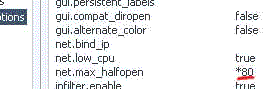
tcputorrent

Bitcomet: Options > Preferences > Connection > max half-open TCP
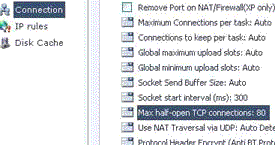
tcpbitcomet

Now you’re ready to go…

A third point of interest is that some “windows updates” revert your tweaked tcp connections back to 10. So it’s wise to check this every now and then. You can check this by going to (in windows xp) Start > Control Panel > Administrative Tools > Event Viewer > System… Look for event 4226 (sort by event).
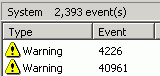
event

For more details about Windows XP SP2 and Event ID 4226 read David Kaspar’s excellent post

If there are a lot of daily occurences it’s likely that the max amount of half-open tcp connections was set back to 10. Or you’re infected with some nasty spyware…

2. Torrent Client Configuration

In order to apply these tips you need to know your maximum up- and download speed. You can test your bandwidth over here (stop all download activity while testing). Also make sure that you applied the tips provided in our previous posts.

Note that there’s a difference between kb/s (kilobits/second) and kB/s (kilobytes/second). To be precise, kB/s = kb/s divided by 8. In this tutorial we use kB/s (like most torrent clients do). This means that you might need to calculate your max speed in kB/s yourself if the speedtest only gives you the results in kb\s (so divide by 8 then).

Settings 1-4 can be found in the options, settings or preference tab of most torrent clients.

1. Maximum upload speed

Probably the most important setting there is. Your connection is (sort of) like a pipeline, if you use you maximum upload speed there’s not enough space left for the files you are downloading. So you have to cap your upload speed.

Use the following formula to determine your optimal upload speed…

80% of your maximum upload speed

so if your maximum upload speed is 40 kB/s, the optimal upload rate is 32kB/s

But keep seeding!

2. Maximum download speed

Although setting your maximum download speed to unlimited may sound interesting, in reality it will only hurt your connection. If you still want to be able to browse properly, set your maximum download speed to:

95% of your maximum download speed

so if your maximum download speed is 400 kB/s, the optimal download speed is 380kB/s

3. Maximum connected peers per torrent

Yet another setting that you don’t want to max out. I experimented quite a lot with the max connected peers settings and came to the conclusion that both high and low number hurt the download speed of a torrent. The following setting worked best for me.

upload speed * 1.3

so if your maximum upload speed is 40 kB/s, the optimal amount of connected peers per torrent is

40 * 1.3 = 52

I didn’t noticed a difference for fast or slow connections here.

4. Maximum upload slots

1 + (upload speed / 6)

so if your maximum upload speed is 30 kB/s, the optimal number of upload slots is

1 + (30 / 6) = 6

relakks pricacy vpn anonymous internet

3. More Tips

Check seeds and peers
A simple tip, but very important. Always look for torrents with the best seed/peer ratio. The more seeds (compared to peers) the better (in general). So 50 seeds and 50 peers is better than 500 seeds and 1000 peers. So, be selective.

Change the default port.
By default, BitTorrent uses a port 6881-6999. BitTorrent generates a lot traffic (1/3), so isp’s like to limit the connection offered on the these ports. So, you should change these to another range. Good clients allow you to do this, just choose anything you like. If you’re behind a router, make sure you have your ports forwarded (portforward.com) or UPnP enabled.

Disable Windows Firewall
It sucks. Windows Firewall hates P2P and often leads a life of it’s own. So disable it and get yourself a decent (free) firewall, Kerio or Zone Alarm for example.

Turn on Encryption
Encrypting your torrents will prevent throttling ISP’s from limiting your BitTorrent traffic. Check out how to enable encryption in Azureus, uTorrent, and Bitcomet, the three most popular torrent clients.

Optimize your internet connection
The TCP optimizer is a freeware utility that optimizes your internet connection. I found it very useful and it helped speeding up my connection for regular internet activity and for downloading torrents. Just download it, and move the slidebar to your maximum download rate (note that it’s in kb/s). Don’t try to set it higher because that will hurt your download speeds!

Last but not least… Buy a faster connection…

Happy Torrenting!

(this post is a compilation of previous “speed up” posts)

If you don't like torrents try MP3 Fiesta. They hold nearly 67,000 albums from nearly 17,000 artists. Prices are around the $0.10 mark for single tracks with full albums coming in at roughly $1.00. Tracks are available from 192kbps and they take major credit cards and PayPal

Previously: Sealand on Fire

Next: Pirates On The Loose

274 Responses (Add yours or TrackBack)

Pages: [1] 2 3 4 5 6 7 8 9 10 11 » Show All

1 Jun 27, 2006 at 02:42 by Oisin G

re: point #1 — it says “half-open” connections — this does not mean you can only have 10 connections at a time: it means you can only have ten connection _attempts in progress_ at any one time. You can still have hundreds of peers connected, but the rate at which you may connect is slowed down. It does not cripple torrents, it merely slows down the spin up time, albeit marginally.

2 Jun 27, 2006 at 02:48 by TheShark

why are you d/l a patch with a backdoor virus

3 Jun 27, 2006 at 02:56 by ags

a virus? Are you sure? That would be awesome. Just what I’d need.

4 Jun 27, 2006 at 03:02 by ikon

Great article dude. I will be sure to pass this on to others.

5 Jun 27, 2006 at 03:17 by Nick

Great article. Little bit of a typo though.
If you still want to be able to browse properly, set your maximum download speed to:

95% of your maximum upload speed

so if your maximum download speed is 400 kB/s, the optimal download speed is 380kB/s

Should say 95% of your maximum download speed.

6 Jun 27, 2006 at 03:35 by Slickick

Thanks for the torrent tips, Cool Page!

7 Jun 27, 2006 at 03:36 by Slickick

digg ROCKS!

8 Jun 27, 2006 at 03:53 by merfe

Backdoor program BDS/Virkel.A.7 was detected by my AntiVir.

9 Jun 27, 2006 at 04:56 by adaw

It’s best to find a tutorial which shows you how to do it without downloading some random patch being hotlinked anyway. Just seeing the link sitting there made me feel uneasy about it.

10 Jun 27, 2006 at 05:12 by jeffk

My AV didn’t find a virus, but I foolishly ran the evid4266 patch *before* I read all the comments. I think/hope I undid all the changes correctly.

Anybody wanna do some research and confirm the virus issue one way or the other?

11 Jun 27, 2006 at 05:15 by Austin

great article one question. Does Vista also limit the connections to 10? I’m using the public beta and that tool doesn’t work(obviously).

12 Jun 27, 2006 at 05:24 by Sachin

Nice article ..except for this slight mistake “kb/s = kB/s divided by 8″ … It should have been :
“kb/s = kB/s multiplied by 8″ or
“kB/s = kb/s divided by 8″

13 Jun 27, 2006 at 05:56 by blah

Those previous comments involving antivir were most likely false positives on the virus scan. I as well as several others have scanned with our respective programs and found nothing strange, plus we’ve been using it for ages.

14 Jun 27, 2006 at 07:12 by Zero

…um…ok, I used that patch, but I don’t know how to undo it. Help please?

15 Jun 27, 2006 at 07:19 by Ernesto

Nick and Sachin, thanks for pointing out the inconsistencies: corrected!

Zero, the patch is perfectly safe and you can undo it by running the patch again and changing to max connections to 10.

About the patch being a virus, this is not the case:

Some AntiVir Software vendors added the patcher into their virus-definitions. The patcher is often detected as ‘Tool/EvID’. But as a first info: The patcher ist NO VIRUS. Some virus and trojanwriter uses the same technique to increase the limit. After that its easier for them to spread to other computers in the internet. This runs without knowledge of the user. So he is not informed about what’s going on. With the patcher here, every user can decide on his own if he wants to change the file and if yes how high the limit should be. Also the user will be warned if he chooses to high limits, as already infected machines will spread existent viruses and trojans easier to the net. So everybody can choose on its own and is not forced to. The patcher itself does not contain malware.The virus-notification therefore should be seen as an information that this program contains the functionality to increase the limit. If that program is not known or has not been installed you can delete it.
I hope I have answered some questions.

16 Jun 27, 2006 at 09:08 by I

“So 50 seeds and 50 peers is better than 500 seeds and 1000 peers”

500 seeds and 1000 peers would almost always be the faster download - remember all those peers are seeders too

UPnP for port forwarding? NO

17 Jun 27, 2006 at 09:38 by Ernesto

[quote]500 seeds and 1000 peers would almost always be the faster download - remember all those peers are seeders too[/quote]

A peer is not a seeder. And torrents with a higher “seed / peer ratio” tend to be healthier.

sure it depends on the % of the complete file the leechers (peers) have on average. The download will probably be faster if all peers are on 95%, but it will be slower if the peers are on 5%. The example is just to sress that it is important to take a look at the the seed / peer ratio.

18 Jun 27, 2006 at 09:58 by web design uk

Im gona totally try these methods! Thanks for the great post

19 Jun 27, 2006 at 15:55 by I

“A peer is not a seeder”

if a peer is not seeding it obviously isn’t taxing your download either…so it wouldn’t be much of a peer.

“And torrents with a higher “seed / peer ratio” tend to be healthier.”

but torrents with a higher number of connections (from EITHER seeds or peers) will generally be faster (assuming one good seed).

now, small files WILL benefit from a high-seed-ratio….but small files should be fast anyway

20 Jun 27, 2006 at 17:35 by Ernesto

“but torrents with a higher number of connections (from EITHER seeds or peers) will generally be faster (assuming one good seed).”

that’s true if the seed has unlimited upload bandwith available, but on average it isn’t.

compare these 2 cases, lets assume all seeds and peers have 100up and 200down:

1. 10 seeds and 10 peers
2. 100 seeds and 200 peers

In the most ideal situation the peers in case 1 will download at full speed and max out their connection (200). However, in case 2 the peers will only get 150 in the most ideal setting.

This is oversimplified, but it’s just the way it is

Pages: [1] 2 3 4 5 6 7 8 9 10 11 » Show All

Add your response

It takes approximately 1 minute for your comment to appear on TorrentFreak after it's posted.



